 Measure Killer
How do I see who exports data from Power BI visuals?
In an admin mode, fetch the activity logs with the ExportReport activity. You get every export of a visual's underlying data: which user, which report and when. Each fetch adds to a local history beyond Microsoft's 28 days.
Last updated · November 6, 2026
Steps
- Open Tenant Analysis with a Fabric Admin account and click Activity logs in the toolbar.
- Pick the date range and include ExportReport under the report activities. Fewer activity types make the fetch faster (details).
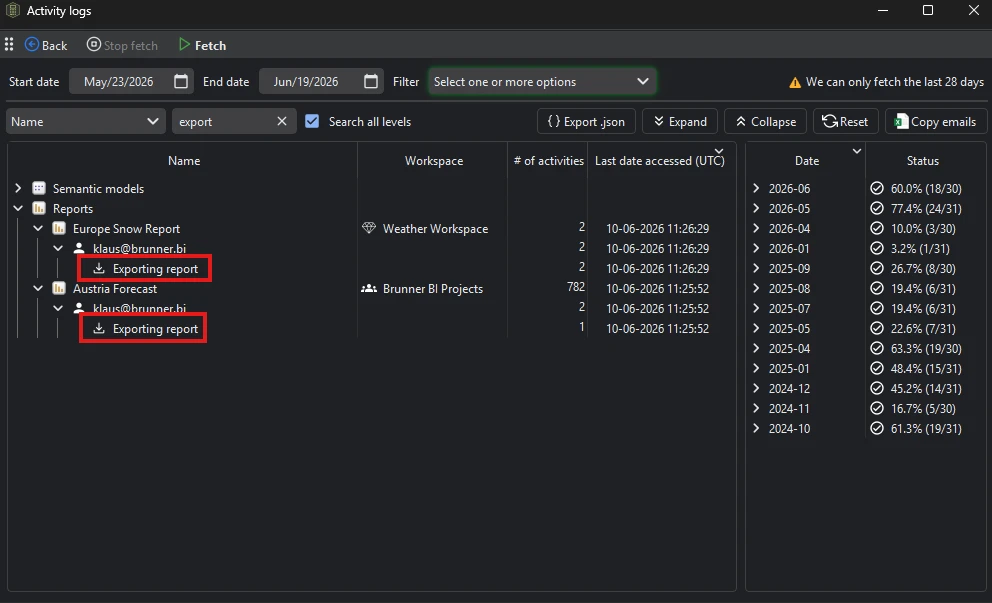
- Fetch, then look through the report activities: each export with the user, the report, its workspace and the time.
- Fetch regularly. Results merge into a local database, so the history grows past the 28 days Power BI keeps.
What you see
Go deeper
Something wrong or out of date on this page?