 Measure Killer
Run Measure Killer as a guest user in another tenant
Working in a customer's or partner's Power BI tenant as a B2B guest? Set the XMLA custom domain and sign in to their organization so Measure Killer scans their tenant instead of your own.
Last updated · August 12, 2026
This applies to Measure Killer’s online modes — Shared model online, Tenant Analysis and Limited Tenant Analysis — which are Enterprise features. The free local scan reads a model open in Power BI Desktop, so the tenant it came from doesn’t matter.
Why Measure Killer lands in your home tenant
When you sign in, Measure Killer authenticates against the generic
myorg alias — and Microsoft Entra resolves myorg to the home
tenant of the account you sign in with. That’s the right answer for
almost everyone, and the wrong one in exactly one case: you’re a
guest (B2B) user, your account lives in tenant A, and the workspaces
you need to scan live in tenant B.
Left alone, two things go wrong:
- The browser sign-in silently authenticates you into your own organization, so Measure Killer lists your own workspaces (or none at all) instead of the host’s.
- The XMLA connection built from
myorgpoints at your home tenant, so reading the model fails even when the workspace list looks right.
Both are fixable, and both need fixing — one setting in the app, one choice in the sign-in popup.
1. Point XMLA at the host tenant’s domain
Open Settings → API and XMLA from the menu bar on the welcome screen.
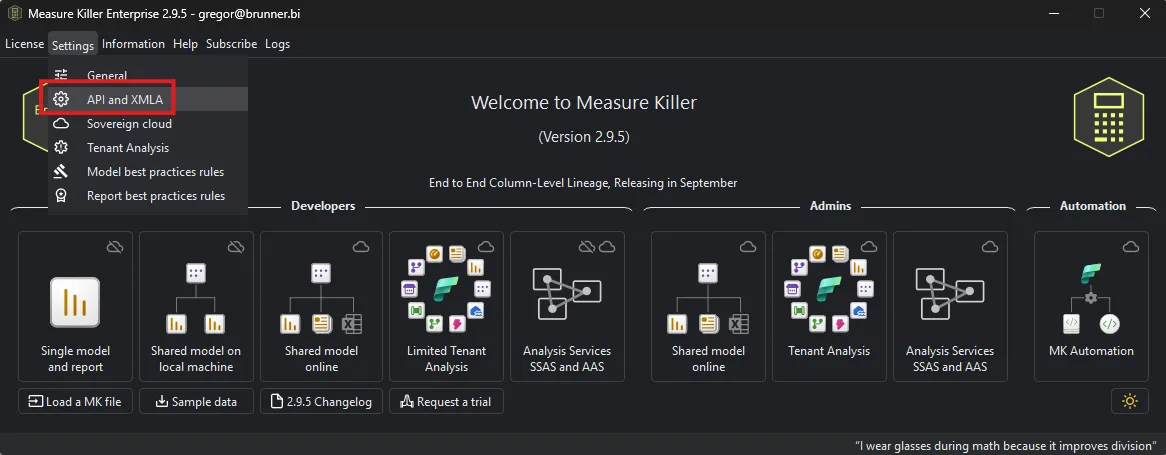
At the bottom of the tab, under XMLA custom domain, tick Use a
custom domain for XMLA (needed for guest users) and enter the host
organization’s tenant domain in the Domain field — the
<tenant>.onmicrosoft.com form, for example
contoso.onmicrosoft.com. That’s the domain every tenant has and the
one that always resolves; a verified custom domain such as
contoso.com works too if the host uses one. The field can’t be left
blank; Measure Killer shows Domain cannot be empty until you fill it
in. Click Save.
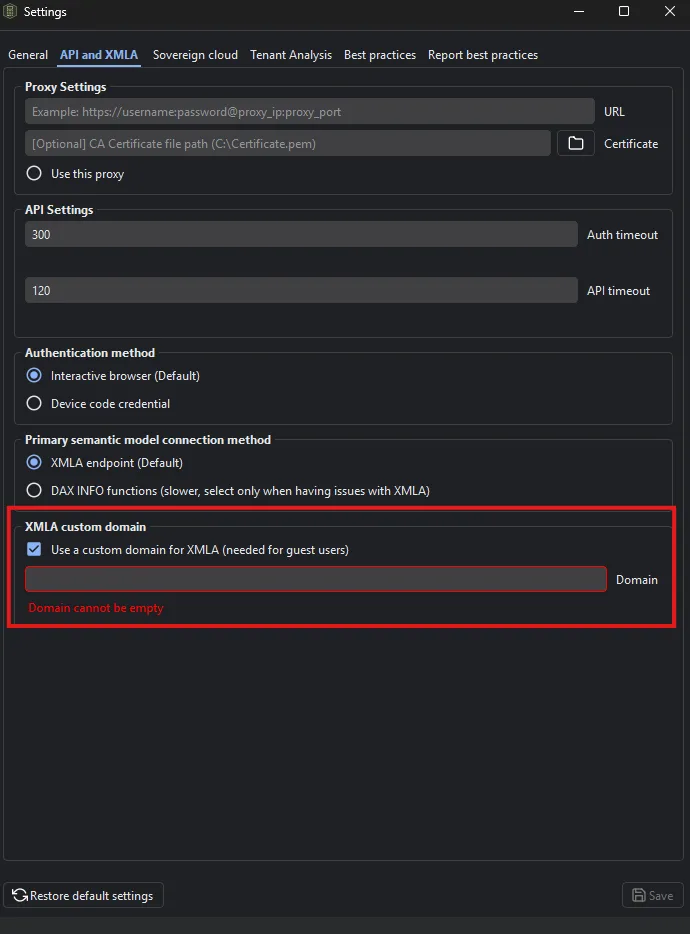
With the box ticked, Measure Killer builds its XMLA connections against
the domain you entered instead of the generic myorg alias — so they
resolve to the host tenant rather than yours.
Restart Measure Killer after saving. The app shows a message box
telling you this, and it isn’t optional — the custom domain only takes
effect on the next start. Carry on without restarting and Measure Killer
keeps using myorg, so XMLA still points at your home tenant even
though the setting looks correct. The same applies whenever you
change the domain or untick the box: save, then restart.
One thing to remember: untick the box again when you go back to scanning your own tenant (and restart). A custom domain left behind from a customer engagement makes your next XMLA connection fail with what looks like a permissions error.
If the host tenant is in a sovereign or national cloud, set that separately under Settings → Sovereign cloud — it’s independent of this setting.
2. Sign in to the host organization, not your own
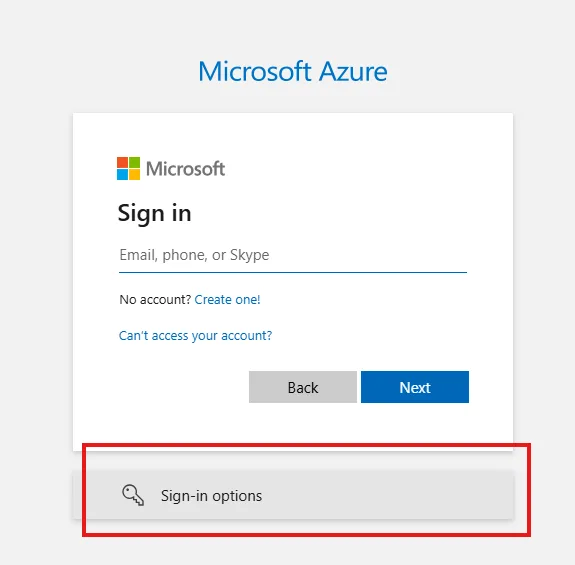
Start the analysis as usual — for example Shared model online or Tenant Analysis. Measure Killer opens your default browser for the Microsoft sign-in.
Don’t type your email address here. Entering your own address sends you to your home tenant, which is exactly what you’re trying to avoid. Instead, click Sign-in options at the bottom of the sign-in box.
Choose Sign in to an organization — “Search for a company or an organization you’re working with.”
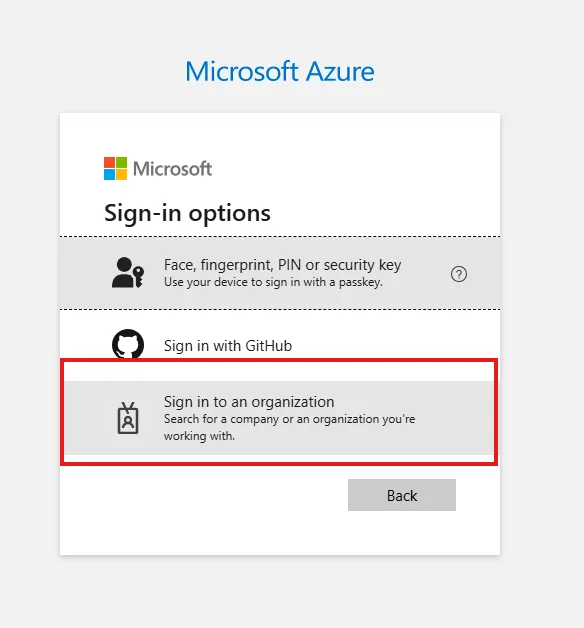
Enter the host organization’s domain name — the same one you put in the XMLA custom domain field — and click Next.
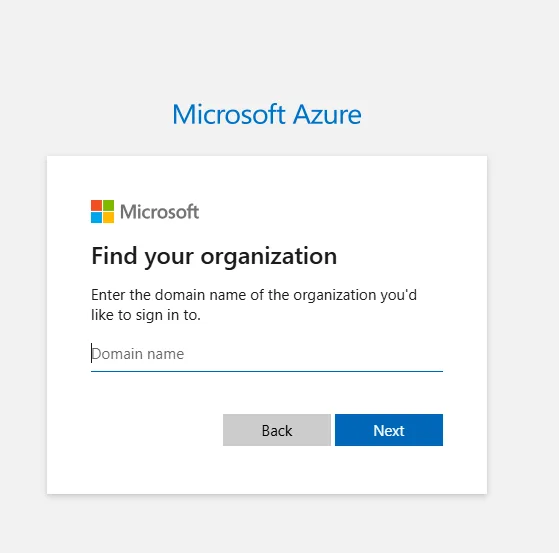
You’re now on the host tenant’s sign-in page. Authenticate with your own guest account (your normal email address and password, plus MFA if they require it) — you’re not asking for one of their accounts, just telling Entra which directory to sign you in to.
Measure Killer opens a second sign-in popup when it reaches the XMLA step, because XMLA needs its own authorization scope. Take the same route there: Sign-in options → Sign in to an organization → domain.
Signed in to the wrong tenant?
Easy to do the first time — you type your email out of habit and land back in your own organization. Measure Killer keeps the token it was given, so simply re-running the analysis won’t prompt you again. To get a fresh sign-in, either:
- Click Reauthenticate, available in several of Measure Killer’s windows, or
- Restart Measure Killer.
Then take the Sign-in options → Sign in to an organization route. If the browser sends you straight back into the wrong tenant without showing the sign-in page, sign out of the Microsoft session there first (or use a browser you’re not signed into).
What to expect once you’re in
Measure Killer now shows the host tenant’s workspaces and content, scoped to what your guest account can see. Everything else works the way it does in your own tenant — the scan, the lineage, the exports.
Your permissions are the limit, and guest accounts are usually granted less than an internal one: expect the workspaces you’ve been added to, and full Tenant Analysis only if the host has given your guest account the Fabric Administrator role. Otherwise you’ll be running Limited Tenant Analysis, which sees only the workspaces you’re a member of.
Troubleshooting
| What you see | What it usually means |
|---|---|
| Domain cannot be empty | The custom-domain box is ticked but the Domain field is blank. Enter the host domain, or untick the box. |
| Your own workspaces are listed | The browser signed you into your home tenant. Click Reauthenticate or restart Measure Killer, then take the Sign-in options → Sign in to an organization route — see Signed in to the wrong tenant? |
| No workspaces at all | You reached the right tenant, but your guest account hasn’t been added to any workspace there — ask the host for a workspace role. |
| No sign-in prompt at all when you re-run | Measure Killer is still holding the token from the previous sign-in. Click Reauthenticate, or restart the app, to force a new one. |
| The sign-in page never appears | The browser reused an existing Microsoft session. Sign out there (or use a browser you’re not signed into) so the sign-in page shows up again. |
| Workspaces list fine, but reading the model fails | The XMLA custom domain is unset, misspelled, or pointing at the wrong domain — recheck step 1. If it’s correct, the host’s capacity may not have the XMLA endpoint enabled (Read, or Read/Write for write-back). |
| The custom domain looks right, but XMLA still hits your home tenant | Measure Killer wasn’t restarted after saving the setting. Close and reopen the app, then re-run. |
| XMLA fails after you go back to your own tenant | The custom domain is still ticked from the guest engagement. Untick it, save, and restart Measure Killer. |
Related
- Run your first online scan — the shared-model flow you’ll usually run as a guest
- Run a tenant-wide scan — full vs Limited Tenant Analysis, and the roles each needs
- License keys — applying the Enterprise or trial key these modes need
- Install Measure Killer — Admin vs Portable installer