 Measure Killer
Try paid features with our sample data
Explore every Enterprise feature without a license key — built-in sample data covers every analysis mode, from shared-model online to Tenant Analysis.
Last updated · June 19, 2026
What you get
Measure Killer ships with hardcoded sample data — a curated set of workspaces, semantic models, reports, dataflows and access assignments — so you can click through every Enterprise feature without scanning your own environment first. No license key, no service principal, no admin role.
Sample data isn’t limited to one mode: you pick which analysis mode you want to try it in, and the app loads a matching sample result.
Use it to:
- See what an end-to-end tenant scan result actually looks like.
- Click through Access & permissions, Lineage, Tenant summary, Similarity and the rest of the paid views with realistic data.
- Export to CSV / Excel and verify the format your team will receive.
- Decide whether Measure Killer is worth a trial or license — before you involve IT, IAM or your security team.
Where to find the button
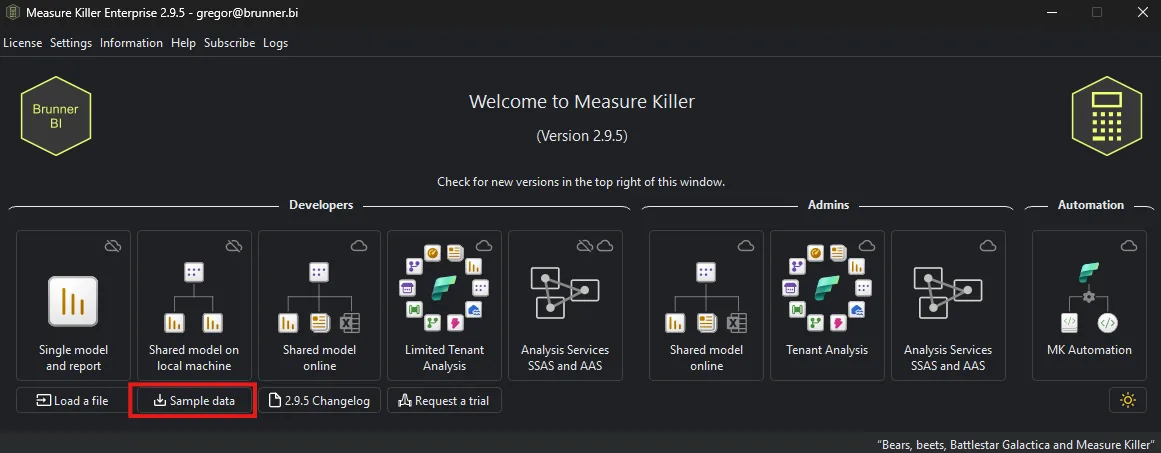
The Sample data button lives on the Measure Killer welcome screen, bottom-left — right next to the Load a file button, under the row of mode tiles (Single model and report, Shared model online, etc.).
Pick a mode to try
Clicking Sample data opens a mode-selection dialog. Sample data is available for every analysis mode:
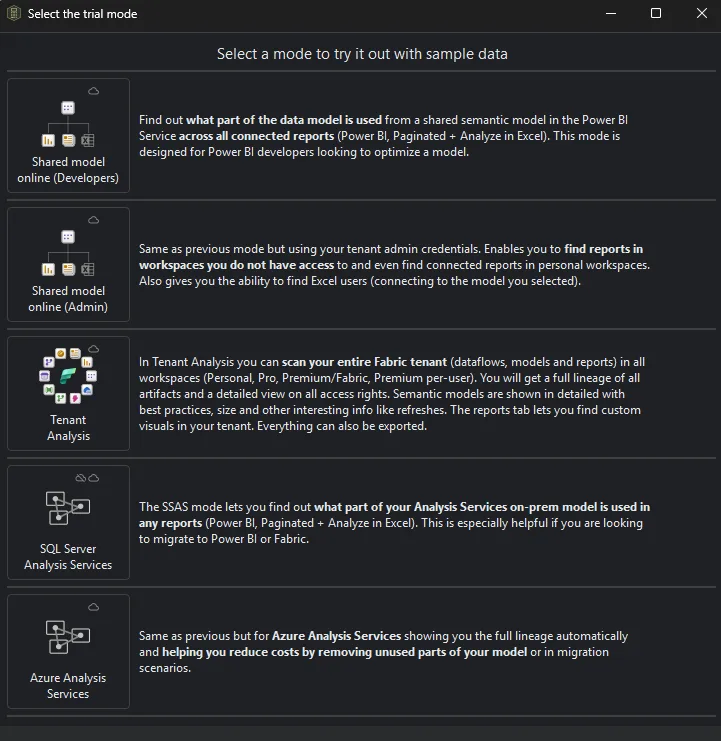
- Shared model online (Developers) — see what part of a shared semantic model is used across all connected reports (Power BI, Paginated + Analyze in Excel).
- Shared model online (Admin) — the same analysis with tenant admin credentials: finds reports in workspaces you don’t have access to, connected reports in personal workspaces, and Excel users.
- Tenant Analysis — a full tenant scan result: lineage across all artifacts, access rights, best-practice checks, model sizes and refreshes, custom visuals, and more.
- SQL Server Analysis Services — see what part of an on-prem SSAS model is used in any reports — especially useful when planning a migration to Power BI or Fabric.
- Azure Analysis Services — the same for AAS, with full lineage for cost reduction and migration scenarios.
Pick a mode and the app loads the bundled sample result, dropping you straight into that analysis.
What’s hardcoded vs. live
| Behavior | Sample mode | Real scan |
|---|---|---|
| Data source | Bundled snapshot inside the .exe | Your Power BI / Fabric tenant |
| Refresh | Static — never changes | Re-run a scan to refresh |
| License required | No | Free for local .pbix; paid for tenant features |
| Permissions required | None | Workspace member or Fabric Admin (depending on view) |
| Exports | Enabled | Enabled (paid features require a license key) |
| Kill via XMLA | Disabled — no real model to write back to | Enabled with appropriate permissions |
The sample data is identical for every user — it’s the same tenant you’d see on a colleague’s machine. Useful when you’re sharing screenshots or walking someone through a feature; everyone is looking at the same numbers.
Common workflows
Stakeholder demo. Open Measure Killer, click Sample data, click through Tenant summary → Access → Lineage. You’re showing real-looking screens in under a minute, no setup.
Pre-purchase evaluation. Run every feature on the sample tenant, export each view, share the exports with the people who’d actually consume them (IT, governance, finance). Decide if the format works for you before committing to a trial key.
Training / onboarding. New team members can learn the UI on the sample tenant before being pointed at production data.
When to switch to a real scan
The sample tenant is great for exploration but it’s frozen — the numbers never change and they’re not yours. Once you’ve decided Measure Killer is useful, request a free trial key and run a real tenant scan against your own environment.