 Measure Killer
Apps & audiences
Every Power BI app in the tenant — including organizational apps — with audiences, 28-day consumption, contacts, and access details.
Last updated · July 20, 2026
What you get
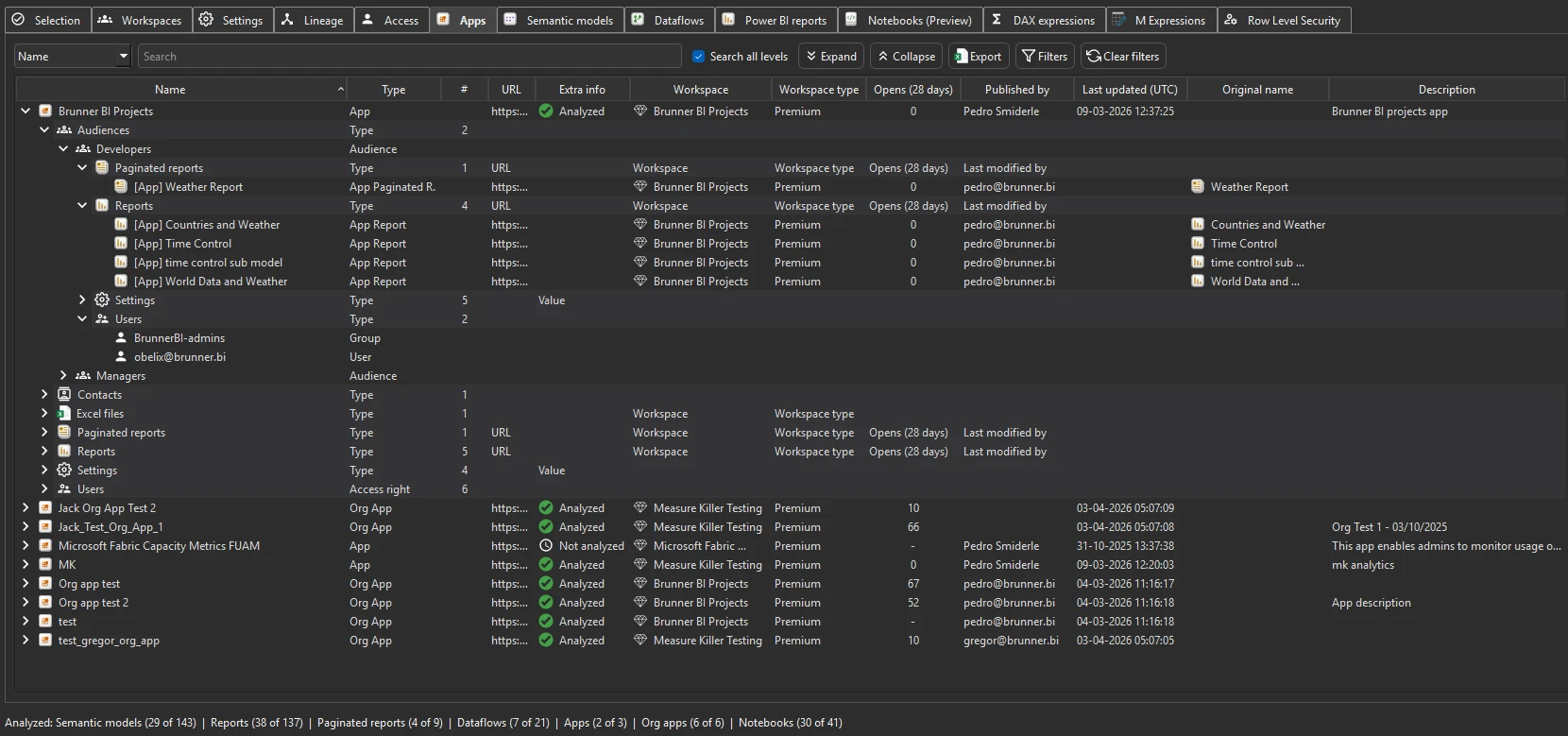
Every Power BI app in the tenant — including organizational apps — with the workspaces each app publishes from, the audiences defined inside each app, 28-day consumption data (opens), contact information, and the users/groups who can access each audience.
For each app you see:
- Name — the app name
- Workspace — which workspace the app publishes from
- Audiences — the audience groups defined inside the app
- Opens (28 days) — how many times the app was opened in the last 28 days
- Contacts — the app’s listed contact information
- Users/groups — who can access each audience
Run the analysis
- Run a tenant-wide scan — the Apps tab populates automatically after Phase 1.
- Switch to the Apps tab.
- Expand any app to see its audiences and access details.
Availability: Audiences for organizational apps — Measure Killer v2.9.6 and later.
Org-app audience membership requires workspace Member access. For a regular workspace app, Contributor is enough to get both the audiences and their members. The restriction is specific to organizational apps: Measure Killer reads each audience and the content exposed to it whenever you can see the app, but it can only list the members of an audience (who the audience is assigned to) when the account running the scan is a Member of the workspace the app publishes from — Contributor is not enough. Fabric Administrators retrieve full audience membership for every org app regardless of workspace role.
Limited Tenant Analysis shows audience-level users, not the app’s overall users. In Limited Tenant Analysis (workspace Contributor / Member, without Fabric Admin), Measure Killer lists the users and groups assigned to each audience, but it cannot report the users of the app as a whole — the combined set of everyone who has access to the app across all of its audiences. That app-wide user list is only available in full Tenant Analysis (Fabric or Power Platform Administrator).
Common workflows
- App adoption review. Sort by 28-day opens to find apps with zero or near-zero usage. These may be candidates for retirement — especially if they’re publishing from Premium capacity that costs money.
- License-compliance audit. Review who can access each app and through which audience. Cross-reference with your license assignments to verify that only licensed users are consuming Pro or Premium content.
- Find organizational apps. Organizational apps are visible to the entire organization by default. Review which ones exist and whether their content is still relevant — stale org apps create confusion.
- Audience hygiene. Check whether audiences are using security groups (easy to manage) or individual users (hard to maintain). Flag apps with many individual user assignments for cleanup.
What to do with the findings
- Export to Excel — click Export in the toolbar to export the full app inventory to Excel for license audits or adoption reviews.
- Export as JSON — paid editions can also export as raw JSON for integration with governance dashboards or access-review workflows.
- Share the
.measurekillerfile — hand the scan to a colleague who can browse app details without re-running the scan.
Related
- Run a tenant-wide scan — the scan that populates the Apps tab
- Access & permissions tracking — workspace and item-level access (complements app-level access)