 Measure Killer
Row-level security (RLS) — roles, filters & members
List every RLS role in every model, the DAX filters behind them, and the people / groups assigned to each — across your whole tenant.
Last updated · June 19, 2026
What you get
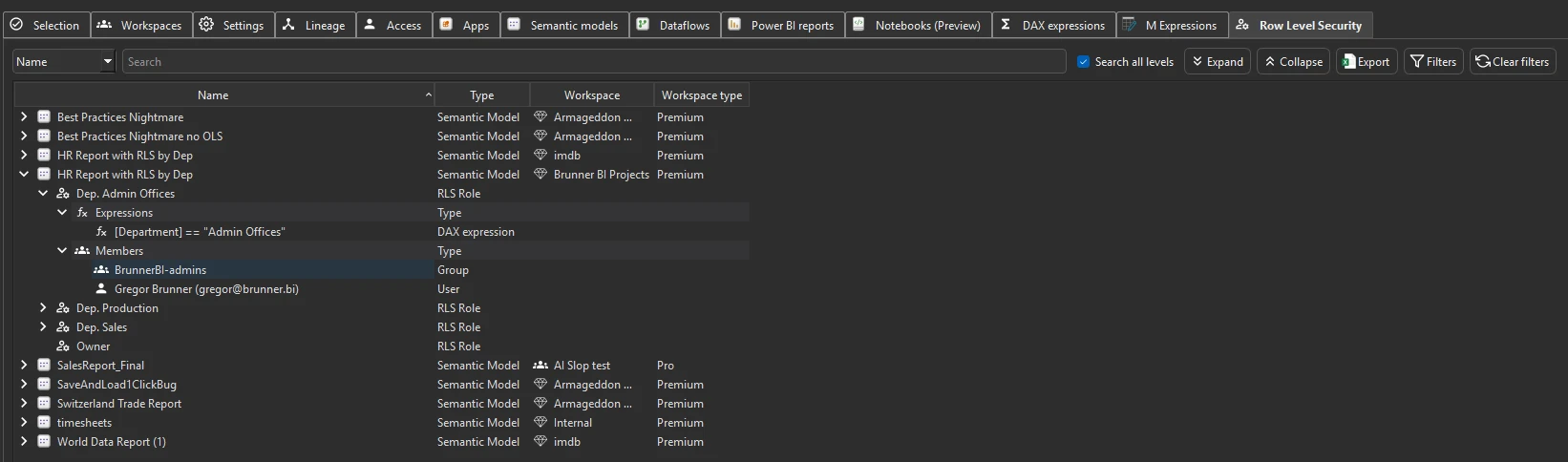
The Row Level Security tab surfaces every RLS role across every scanned semantic model in one view. For each role you see:
- The model it belongs to — name, workspace, and storage mode
- The DAX filter expression — the actual filter logic that restricts which rows users in this role can see
- The tables the filter applies to — which tables in the model are filtered by this role
- The members — which users, security groups, or service principals are assigned to the role
This gives you a tenant-wide picture of who can see what data, without opening each model individually in Power BI Desktop or the Service.
Run the analysis
- Run a tenant-wide scan that includes the models you want to audit. Make sure Row Level Security is enabled in the pre-filters (it’s on by default).
- Wait for Phase 2 to complete — RLS metadata is part of the deep per-model scan.
- Switch to the Row Level Security tab.
- Browse, search, or filter by model, role name, or member.
What the columns mean
- Model — the semantic model this role belongs to
- Role — the name of the RLS role
- Table filter expression — the DAX expression that filters rows
for this role (e.g.
[Region] = "EMEA") - Table — which table the filter applies to
- Members — the users or groups assigned to this role
Common workflows
- Audit who is in a specific role across every model. Search for a role name like “Finance” or “Regional Manager” — the view shows every model that has a role with that name, with the members listed side by side. Useful for verifying that the same people have consistent access across related models.
- Find models without RLS that probably need it. After a tenant scan, models with sensitive data but no RLS roles stand out — they’ll simply have no rows in the RLS tab. Cross-reference with the Semantic models tab to identify which ones contain sensitive tables.
- Spot inconsistent role definitions across models. When multiple models implement the same business logic (e.g. regional filtering), the DAX expressions should match. The RLS tab lets you compare filter expressions side by side without opening each model.
- Verify after a role change. After modifying RLS roles in a model, re-run a scan and check the RLS tab to confirm the change landed correctly and the right members are assigned.
Object-level security (OLS)
Measure Killer also detects object-level security. Tables with OLS applied are identified and flagged during the scan. However, OLS detection is currently at the table level only — individual columns with OLS are not tracked separately.
A known blind spot — group membership
Measure Killer can see which security groups, Azure AD groups, or Entra groups are assigned to an RLS role — but it cannot resolve who is inside those groups. Group membership lives in Entra ID and is not exposed through the Power BI / Fabric APIs that the RLS view reads.
In practice: if an RLS role is assigned to BI-Analysts-Global, you
will see that group name in the Members column, but not the individual
people inside it. To get effective per-user RLS membership, combine
the MK RLS export with a group-membership export from Entra ID.
This is the same limitation that affects the Access & permissions view.
What to do with the findings
- Export to Excel — click Export in the toolbar to export the full RLS inventory to Excel for security reviews or compliance documentation.
- Export as JSON — paid editions can also export as raw JSON for integration with access-review workflows, compliance dashboards, or ticketing systems.
- Share the
.measurekillerfile — hand the scan to a security team member who can open it and review RLS assignments without needing their own admin permissions. - Fix in Power BI — RLS roles are defined in Power BI Desktop (Modeling → Manage roles) or in the Service. Use the findings from Measure Killer to identify what needs to change, then apply the changes in Power BI directly.
Related
- Access & permissions tracking — workspace and item-level access audit (complements RLS)
- Tenant summary — aggregate counts that help identify models worth auditing
- Run a tenant-wide scan — how to run the scan that populates the RLS view