 Measure Killer
License keys
How license keys work, how to enter one, and what changes when you do.
Last updated · November 21, 2026
What a license key unlocks
Without a key Measure Killer runs as the free desktop edition — no time limit, free for personal and commercial use. A key unlocks the paid features for the edition tied to it (Enterprise).
| Edition | Unlocked with key |
|---|---|
| Measure Killer Free | (no key needed) |
| MK Enterprise | All features incl. tenant-wide scans, lineage, access tracking |
Trial vs paid keys
Both kinds work the same way — paste them into the app, the paid features turn on. The difference is just the validity:
- Trial key: time-limited. Expires on its own. Nothing is billed, no card on file. Request one here. To test Clean TMDL, run a local file in Single model and report mode (the free desktop mode). If you would rather not run it in your own tenant, or want to see a specific example such as a particular data source, we can send you test files on request: email gregor@brunner.bi.
- Paid key: tied to your annual subscription.
Enter a key
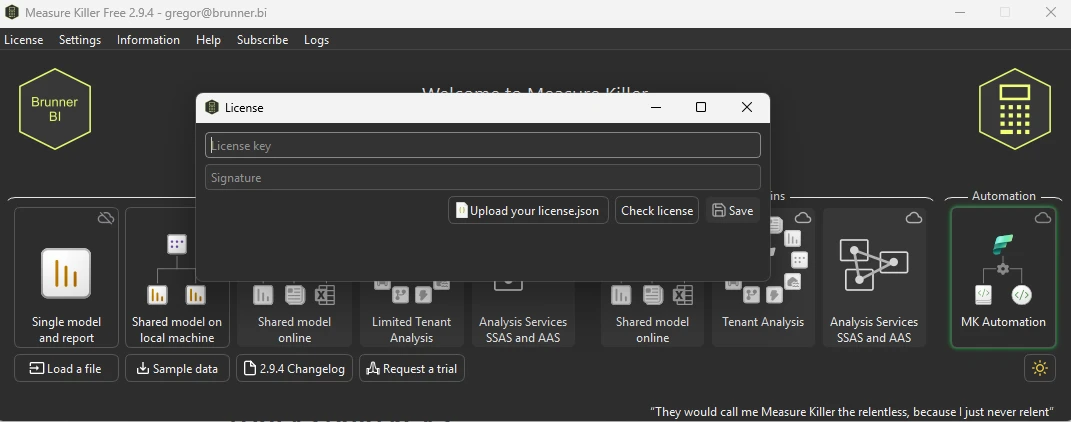
- Open Measure Killer and click License → Enter your license in the menu bar.
- The License dialog opens with two fields:
- License key — paste your license key here.
- Signature — paste the full signature string here. This is a long string — make sure you paste the entire thing, not just the first few characters.
- Click Submit license to verify and apply it.
Alternatively, if you received a license.json file (paid customers
only, trial licenses are entered manually), click Upload license file (.json)
in the dialog (or Upload your license.json in the menu bar) and select
the file.
After applying a key, the title bar changes from “Measure Killer Free” to “Measure Killer Enterprise” (paid key) or “Measure Killer Trial” (trial key) and the paid features become available.
Remove a key
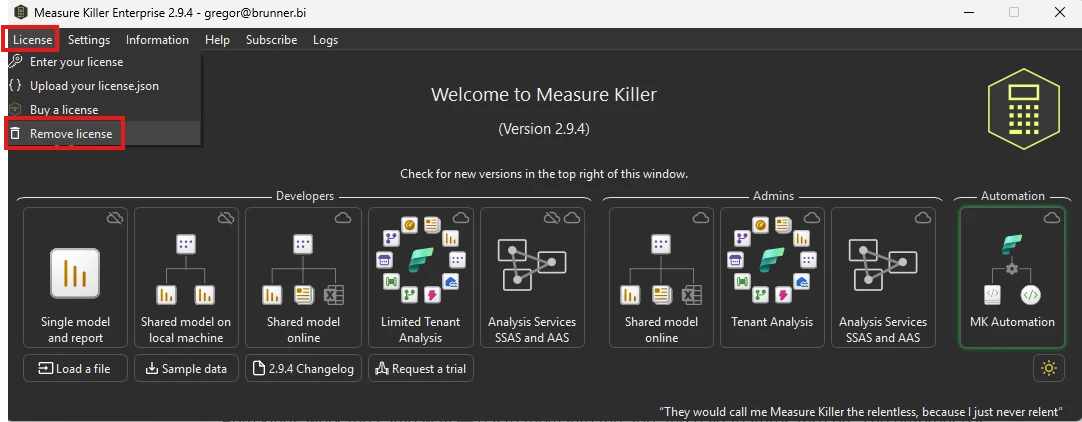
To remove a license key, click License → Remove license in the menu bar. Measure Killer reverts to the free edition immediately — no restart needed.
This is useful when reassigning a license to a different person, or when a trial has ended and you want to continue using the free edition.
When a key expires
- Trial keys expire after the trial period.
When the trial ends, Measure Killer reverts to the free edition
automatically. All views you already generated remain visible, but
paid features (exports, XMLA removal) are disabled. Clean TMDL keeps
working for a single model or report, as in the free edition.
Your scan data is not lost — you can still browse results and save
.measurekillerfiles. - Paid keys are tied to your annual subscription. If the subscription lapses, the key stops working at the end of the billing period. Renewal reactivates the same key — no re-entry needed if the key is still saved in the app.
In both cases, the free edition features continue to work without interruption.
Renewed, but Measure Killer still says the license expired
When your subscription renews, or we extend your license, we extend the same key on our side. You do not need to enter anything new.
Versions of Measure Killer older than 2.9.3 do not pick up that extension. They keep the old expiry date and show an error that your license has expired, even though it has been extended.
To fix it, update Measure Killer to the latest version. Click the update button in the top right of the app, or download the latest version from the download page. The new version reads the extended expiry date from the key you already have.
If you cannot update, for example because installs are locked down on your machine, contact us and we will send you a new license key instead.
Users, billing & transfers
- One user = one named person. MK Enterprise is licensed per named user — one user license covers one specific person, not a shared/concurrent login. Buy as many users as the number of people who will use the paid features. (The Enterprise licensing agreement refers to each user license as a “seat”.)
- Annual billing. Paid subscriptions are billed annually. The price shown on the pricing page is per user, per year (the monthly figure is annual ÷ 12, billed once a year), plus VAT where applicable.
- License transfers. A user license is tied to its named person and is not freely transferable between people. It can be reassigned to another person only when the original user leaves the company or is on permanent leave, and only if Brunner BI is informed of the reassignment in advance — see the Enterprise licensing agreement (clause 2). The same user may install and activate their license on multiple machines (for example a desktop and a laptop) — there is no need to remove it from one machine to use it on another.
- Servers & shared environments. Running Measure Killer on a virtual machine, terminal/remote-desktop server, or other shared computing environment requires a Server License (one per environment, unlimited users) instead of per-user licenses — see the Enterprise licensing agreement (clause 2c). To price this, please contact us and describe your specific setup.
- Unlimited users. Instead of licensing per user, you can license Measure Killer for unlimited users across your organization. This option is priced solely by the size of your production capacity (the Fabric/Power BI environment), and grants an unlimited number of users. Switch the Enterprise plan toggle on the pricing page from Per user to Unlimited, or build a quote directly.
- No credit card for trials. A free trial needs no card on file and nothing is billed; the trial key simply expires on its own.
Related
- Request a free trial — get a trial key
- Pricing — see the paid editions
- Compare editions — full feature matrix across Free, Enterprise, and Automation
- Enterprise licensing agreement (PDF) — full terms: user licensing, transfers, server licenses, billing
Something wrong or out of date on this page?