 Measure Killer
Report data exports (ExportReport activity)
Track the ExportReport activity — when consumers export a visual's data: easily-missed CU spikes, and a potential way for data to move past report access controls.
Last updated · June 23, 2026
What you get
Every ExportReport event from the Power BI activity log — the action Power BI records when a consumer exports the underlying data of a visual. For each export you can see which user exported, which report (and workspace) it came from, and when it happened.
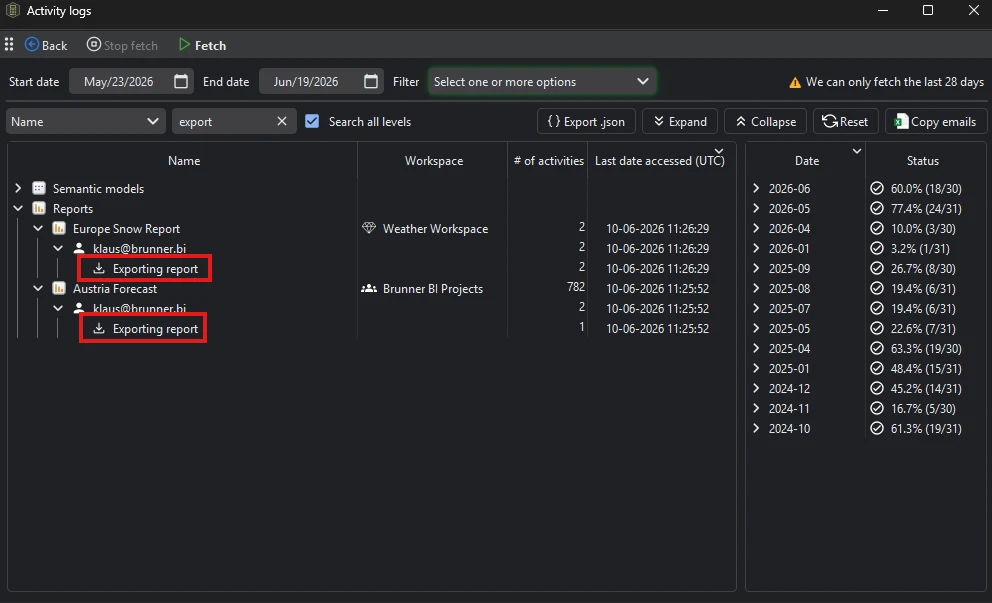
Power BI surfaces this nowhere as a tenant-wide list. Measure Killer pulls it from the admin activity-log API and keeps it as part of the Report activities, alongside report opens and the other report-level events.
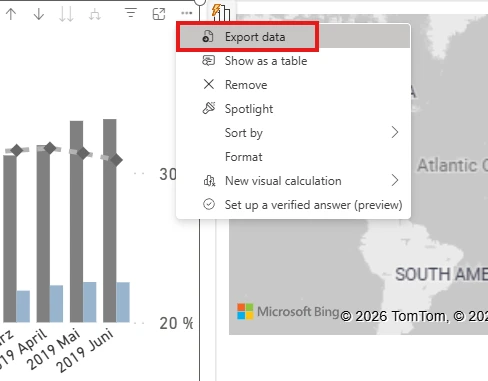
The event is triggered whenever a consumer chooses Export data from a visual’s options (⋯) menu:
Why it matters
It can cause capacity (CU) spikes
Exporting the data behind a visual is not free. Power BI re-runs the visual’s query — often pulling far more rows than the visual actually displays — and then materializes the result for download. A single large export, or many users exporting from heavy reports, can produce a sharp, short-lived Capacity Unit spike that is hard to explain after the fact.
Crucially, exports register as interactive usage in capacity metrics — not background usage like a scheduled refresh. That means they count against your interactive CU and can contribute to interactive throttling, the kind users feel immediately as slow or unresponsive reports.
If Capacity metrics shows an interactive CU spike you can’t tie to a refresh or a subscription, ExportReport activity is a prime suspect — line the spike up against the export events to find the report and the users behind it.
It can sidestep your access controls
Export data can also become a quiet way for data to leave the governance you’ve put on the report. Anyone who can open a report could export the rows behind a visual to a spreadsheet — and that file carries none of Power BI’s protections: no row-level security, no workspace permissions, no sensitivity-label enforcement, no audit trail. From there it could be shared or emailed onward, potentially reaching people who were never granted access to the report or the underlying model.
The ExportReport activity is one of the few ways to see who is potentially moving data out this way — which users export, and from which sensitive reports — so you can follow up where it actually matters. Pair it with Access & permissions to see who could potentially export from a given report in the first place.
It tells you what users are actually doing
A high volume of data exports from a report is a governance signal in its own right. It often means the report isn’t answering the question users have — so they pull the data into Excel and finish the job there — or that data is leaving the governed report boundary as ad-hoc spreadsheets. Either way, the people exporting and the reports they export from are worth knowing about.
Run the analysis
- Open Measure Killer in any admin mode and run a tenant-wide scan, or open the Activity logs action directly.
- Pick the date range and fetch the activity logs. You can choose which activity types to fetch — include ExportReport under the report activities. Fetching fewer types speeds up the scan on large tenants.
- Like all activity-log data, results merge into the local SQLite
database in
%APPDATA%, so history accumulates beyond Power BI’s 28-day window with each scan.
Export the data
ExportReport events are written out as part of the Report activities JSON export — see the Exports overview. Use it to feed export activity into a governance dashboard or to cross-reference against capacity data downstream.
For unattended collection, MK Automation runs the same activity-log fetch on a schedule and writes the results to Fabric tables or your data warehouse.
Related
- Capacity metrics — tie export-driven CU spikes back to the actual capacity bill
- Performance & optimization — where export activity fits the broader capacity picture
- Power BI governance & monitoring — understanding what users are doing across the tenant
- Security & access — who can reach (and therefore export from) each report
- Report views & opens — interactive consumption, the companion to export activity
- Identify Excel users — the same activity-log scan, for Excel and XMLA connections
- Report subscriptions — another easily-overlooked capacity driver
- Run a tenant-wide scan — the scan that collects activity-log data
- Exports overview — the Report activities JSON export