 Measure Killer
Fabric notebooks inventory
Every Fabric notebook in the tenant: workspace, run and session durations, last run, schedule, lines of code, and the full code with comments, searchable across all notebooks.
Last updated · September 22, 2026
What you get
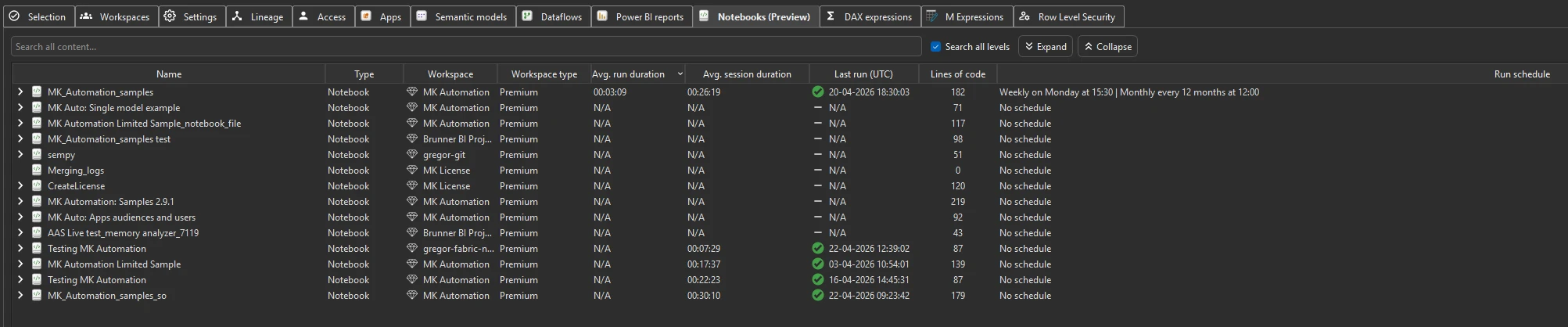
Fabric notebooks across the tenant: where they live, how often and how long they run, when they last ran, and how big they are. Measure Killer also retrieves the full code of every notebook, comments included, so you can read, search and audit all of it in one place.
For each notebook you see:
- Name, full code and comments: expand the arrow next to the name to see the code
- Type
- Workspace and Workspace type (e.g. Premium)
- Avg. run duration: average run time (
HH:MM:SS),N/Aif it has never run - Avg. session duration: average session length (
HH:MM:SS) - Last run (UTC): timestamp of the last run with a success/failure status indicator (
N/Aif it has never run) - Lines of code: total lines across all cells
- Run schedule: the configured run schedule (e.g. Weekly on Monday at 15:30), or No schedule
- CU (s) (new in v2.9.5): the notebook’s Capacity Unit consumption for the default 14-day window, populated after fetching Capacity metrics (which holds the longer history)
Right-click a notebook and choose View job instances to drill into its full run history.
Notebook code and comments
Expand a notebook in the list to see its complete code, comments included, right in Measure Killer. Expand and Collapse above the list open or close all notebooks at once. There is no need to open each notebook in Fabric one by one.
With Search all levels ticked, the search bar covers the code and comments of every notebook at once, so a single search audits the whole tenant: every notebook that imports a library, reads a specific table, or mentions a server you are about to decommission.
Run the analysis
- Run a tenant-wide scan and complete Phase 2 by selecting items and clicking Analyze.
- Switch to the Notebooks tab.
- Use the search bar to find specific packages, keywords, or data references across the code and comments of all notebooks.
- Expand a notebook to read its full code.
Common workflows
- Find notebooks that reference a specific package. Search for
a package name (e.g.
pandas,pyspark,delta) to find every notebook that imports it. Useful before upgrading or deprecating a library. - Audit notebook sprawl. Sort by workspace to see how notebooks are distributed. A workspace with dozens of notebooks may need cleanup or reorganization.
- Find data source references. Search for server names, database names, or connection strings to find every notebook that connects to a specific source — the same workflow as the M Expressions search but for notebook code instead of Power Query.
- Find hard-coded credentials. Search for
password,secretorkeyto find notebooks with credentials written into the code or left behind in a comment. - Estimate migration effort. Sort by lines of code to identify the largest notebooks. These will take the most effort to review, refactor, or migrate.
What to do with the findings
- Export as JSON — paid editions can export the full notebook inventory, including content, for downstream analysis.
- Share the
.measurekillerfile — hand the scan to a colleague for review.
Related
- Run a tenant-wide scan — the scan that populates this tab
- Tenant summary — aggregate counts including notebook totals