 Measure Killer
Power BI lineage in Snowflake
Push Power BI and Fabric lineage into Snowflake with MK Automation, built on OpenLineage. See the dataflows, semantic models, reports, pages and visuals downstream of a Snowflake table in Snowsight, with column-level relationships.
Last updated · October 6, 2026
Our second catalog integration, built on OpenLineage
After Databricks Unity Catalog, Snowflake is the second platform Measure Killer writes Power BI lineage into. It runs from MK Automation, uses the open OpenLineage format and is available today.
Talk to us about setting it up →What you get
Snowflake knows everything up to the edge of your warehouse. It sees your tables, every view and dynamic table built on them, and then the trail stops at the Power BI connector. Everything downstream of that point is invisible to Snowflake, which is exactly where most of the business logic and all of the consumption lives.
Measure Killer closes that gap. It takes the Power BI and Fabric graph it already builds during a tenant scan and sends it to Snowflake as OpenLineage, the open standard Snowflake accepts for lineage from systems it does not track itself. The graph then continues straight through into Power BI, inside Snowsight’s own lineage view, with no separate tool to open.
What Measure Killer writes into Snowflake
The integration writes the same objects as our Unity Catalog integration. Each Power BI or Fabric item appears in Snowsight’s lineage graph as its own object, downstream of the Snowflake tables it reads:
| Item | Where it sits in the graph |
|---|---|
| Gen1 / Gen2 dataflow | Directly downstream of the Snowflake tables it loads |
| Semantic model | Downstream of the tables or dataflows it imports from |
| Power BI report | Downstream of the semantic model it is built on |
| Report page | Inside its report |
| Visual | On its report page |
| Paginated report | Downstream of the semantic model it queries |
| Excel file connected to a model | Downstream of the semantic model it queries |
Between those objects, and between them and your Snowflake tables, Measure Killer writes the lineage at column level, using OpenLineage’s column lineage facet. Each relationship carries the individual column mappings that make it up.
Those mappings include the aggregations and transformations defined
inside the semantic model, in DAX and Power Query, such as
Total Price → Total Revenue, Transaction Date → Month or
Quantity → Total Quantity. No connector that reads the Power BI REST
API can see them. Resolving them is what Measure Killer’s
reference detection does.
Following one column
Because the lineage is written at column grain, you can select a single
column in Snowsight and see only what it touches. Pick DATETIME on the
SALES_TRANSACTIONS table and Snowflake follows it into the dateTime
column of a Power BI dataflow, on into Transaction Date and
Transaction Time in a semantic model, and into Month in a second
model that imports from the first:
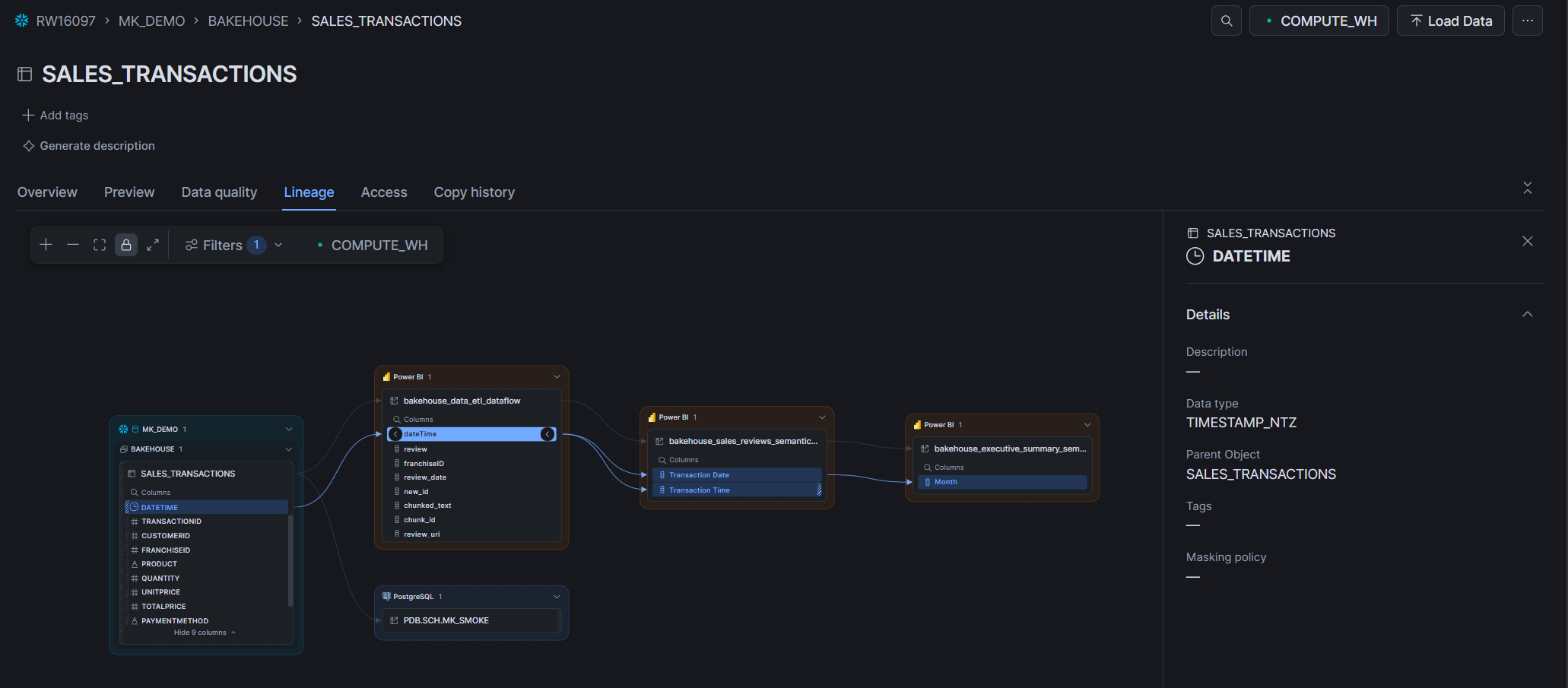
From a Snowflake table to a visual
Expanded fully, the object-level graph runs from the Snowflake table all the way to individual visuals: the dataflows and semantic models reading the table, the reports built on them, their pages, the visuals on those pages, paginated reports and connected Excel files, each as its own node.
The complete column path, resolved in one view, is what Measure Killer itself shows. See source-to-visual lineage. The Snowflake integration is about making that graph visible to the people who work in Snowflake, not about replacing the view where the end-to-end trace reads best.
How to run it
The integration runs from MK Automation, not the desktop app, because it is meant to run on a schedule and keep Snowflake current:
- Scan the tenant. The automation job runs a tenant scan as it normally would, building the lineage graph across your Power BI and Fabric estate.
- Connect your Snowflake account. The push runs from a Fabric notebook, signed in to Snowflake as the account described in Snowflake permissions below.
- Push. Measure Killer describes the Power BI graph in OpenLineage, matching your Snowflake tables to the Power BI items that consume them, and sends it to Snowflake.
- Schedule it. Re-run on the same cadence as your scan. Daily or weekly is typical.
Snowflake permissions
Measure Killer ingests the lineage from a Fabric notebook, so it needs
its own login to Snowflake. Use a service account, or alternatively a
named user, whose default role (for example MK_LINEAGE_ROLE) has:
- On the account:
INGEST LINEAGE,VIEW LINEAGEandDELETE LINEAGE. Delete is what keeps the graph honest: when a semantic model or report is removed from Power BI, Measure Killer removes its relationships to your Snowflake tables completely, so no lineage is left behind for items that no longer exist. - On every database and schema the lineage starts from:
USAGE. - On the tables and views the lineage starts from:
SELECT.
The role needs no access to anything else in the account. As a sketch, with your own object names:
CREATE ROLE MK_LINEAGE_ROLE;

GRANT INGEST LINEAGE ON ACCOUNT TO ROLE MK_LINEAGE_ROLE;
GRANT VIEW LINEAGE   ON ACCOUNT TO ROLE MK_LINEAGE_ROLE;
GRANT DELETE LINEAGE ON ACCOUNT TO ROLE MK_LINEAGE_ROLE;

-- repeat for each database and schema the lineage starts from
GRANT USAGE ON DATABASE SALES               TO ROLE MK_LINEAGE_ROLE;
GRANT USAGE ON SCHEMA   SALES.PUBLIC        TO ROLE MK_LINEAGE_ROLE;
GRANT SELECT ON ALL TABLES IN SCHEMA SALES.PUBLIC TO ROLE MK_LINEAGE_ROLE;
GRANT SELECT ON ALL VIEWS  IN SCHEMA SALES.PUBLIC TO ROLE MK_LINEAGE_ROLE;

-- covers tables and views created in the schema later
GRANT SELECT ON FUTURE TABLES IN SCHEMA SALES.PUBLIC TO ROLE MK_LINEAGE_ROLE;
GRANT SELECT ON FUTURE VIEWS  IN SCHEMA SALES.PUBLIC TO ROLE MK_LINEAGE_ROLE;

GRANT ROLE MK_LINEAGE_ROLE TO USER MK_LINEAGE_SVC;
ALTER USER MK_LINEAGE_SVC SET DEFAULT_ROLE = MK_LINEAGE_ROLE;
If only some tables in a schema feed Power BI, grant SELECT on those
tables and views individually and skip the schema-wide and future
grants.
Who this is for
- Snowflake-first data platforms. If Snowflake is the center of your data governance, this is how Power BI stops being a blind spot in it, without asking your Snowflake team to learn a second catalog.
- Impact analysis before a table change. Before altering or dropping a Snowflake column, Snowsight now answers “which visuals break?”, not just “which views break?”.
- Regulated-data scope. For a column holding personal data, the downstream reports and visuals consuming it are visible from the same place, with no cross-referencing two tools by hand.
- Cost work on the warehouse side. Tables and columns that reach no Power BI visual anywhere in the tenant are candidates to stop loading and computing.
Related
- Power BI lineage in Databricks Unity Catalog: the same lineage, written into Unity Catalog
- Power BI lineage via OpenLineage: the format behind this integration, for any tool that supports it at column level
- Source-to-visual column lineage: the lineage engine behind this integration
- MK Automation: the scheduled path this integration runs on
- Run a tenant-wide scan: the scan that builds the graph being pushed