 Measure Killer
How do I find broken DAX measures in my Power BI semantic models?
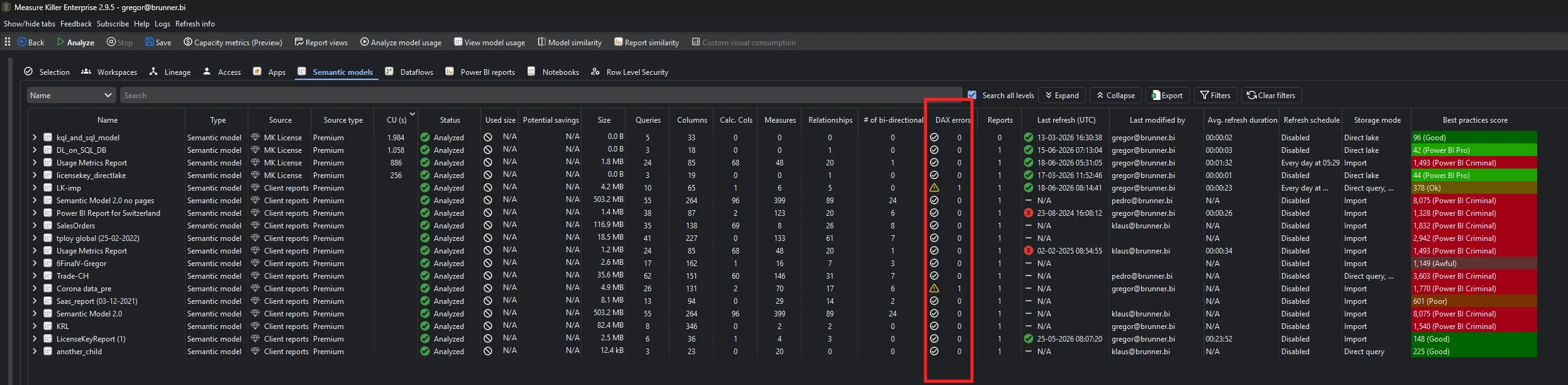
Run Tenant Analysis or Limited Tenant Analysis, then sort the DAX errors column on the Semantic models tab. Drill into a model to see every failing measure, calculated column and calculated table with the exact error.
Last updated · November 6, 2026
Steps
- Open Tenant Analysis or Limited Tenant Analysis (details).
- On the Selection tab, tick the semantic models you want to check and click Analyze (Phase 2).
- Open the Semantic models tab and sort DAX errors descending.
- Drill into a model to see each failing measure, calculated column or calculated table, how often it is used, and the exact error message (details).
- Open the DAX expressions tab to read and search the code behind the error (details).
What you see
Go deeper
Something wrong or out of date on this page?