 Measure Killer
How do I find duplicate DAX measures, within one model and across the tenant?
Open the DAX expressions tab and click Duplicate DAX to see measures with identical definitions in a model, then Find duplicates tenant wide for the same across every scanned model. Across models it shows whether a KPI is calculated the same way everywhere.
Last updated · November 6, 2026
Steps
- For one model, open it in Power BI Desktop, pick Single model and report and click Analyze. This works in the free edition (details). To compare models, run Tenant Analysis or Limited Tenant Analysis and click Analyze on them (details).
- Open the DAX expressions tab and click Duplicate DAX.
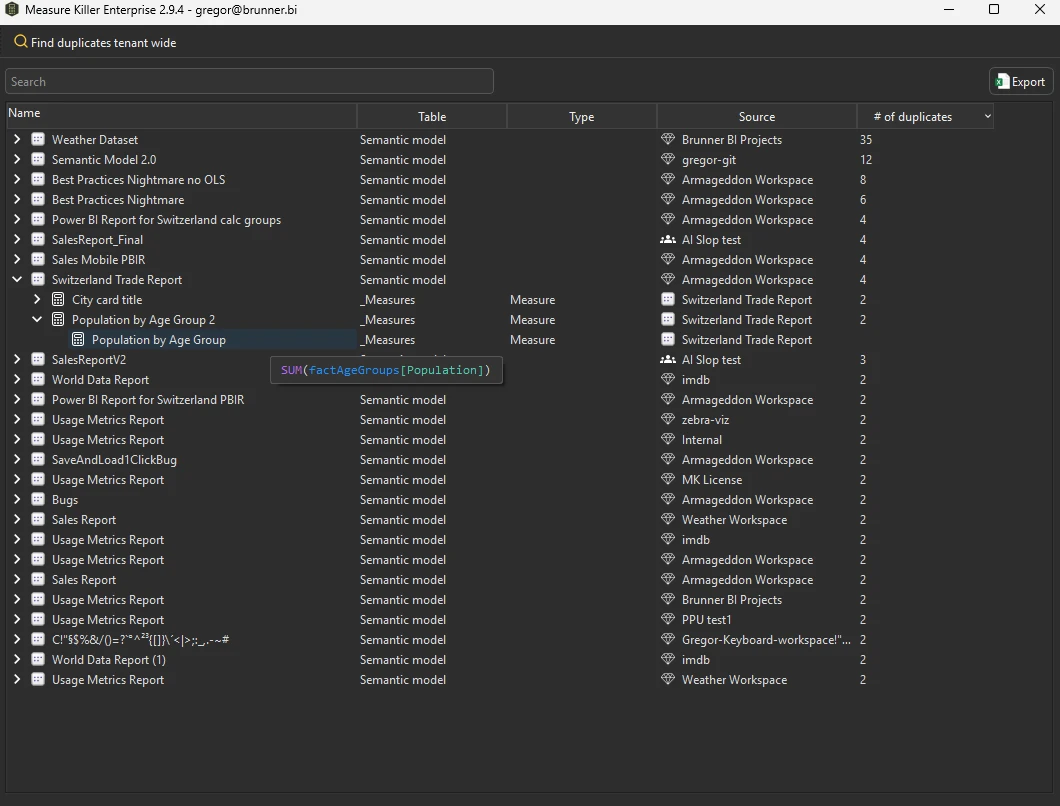
- Each model lists how many of its measures share a definition. Expand it to see which measures are identical and hover one to read the DAX.
- In Tenant Analysis or Limited Tenant Analysis, click Find duplicates tenant wide to compare across every scanned model.
How to read it
Within one model, duplicate DAX is usually not needed. The exception is the same calculation kept twice for different formats, for example a value and a percentage version. Everything else is a candidate to remove or to replace with a reference to one measure.
Across models, duplicates are often fine: each model needs its own “Total Sales”. What you want to check is the opposite, that a KPI is calculated the same way everywhere. Search the DAX expressions tab for the measure name and compare the definitions side by side (search tips).
What you see
Go deeper
- DAX expressions
- Find duplicate models and reports: duplicates at model level
Something wrong or out of date on this page?