 Measure Killer
How do I see what is in personal workspaces and who is sharing reports from them?
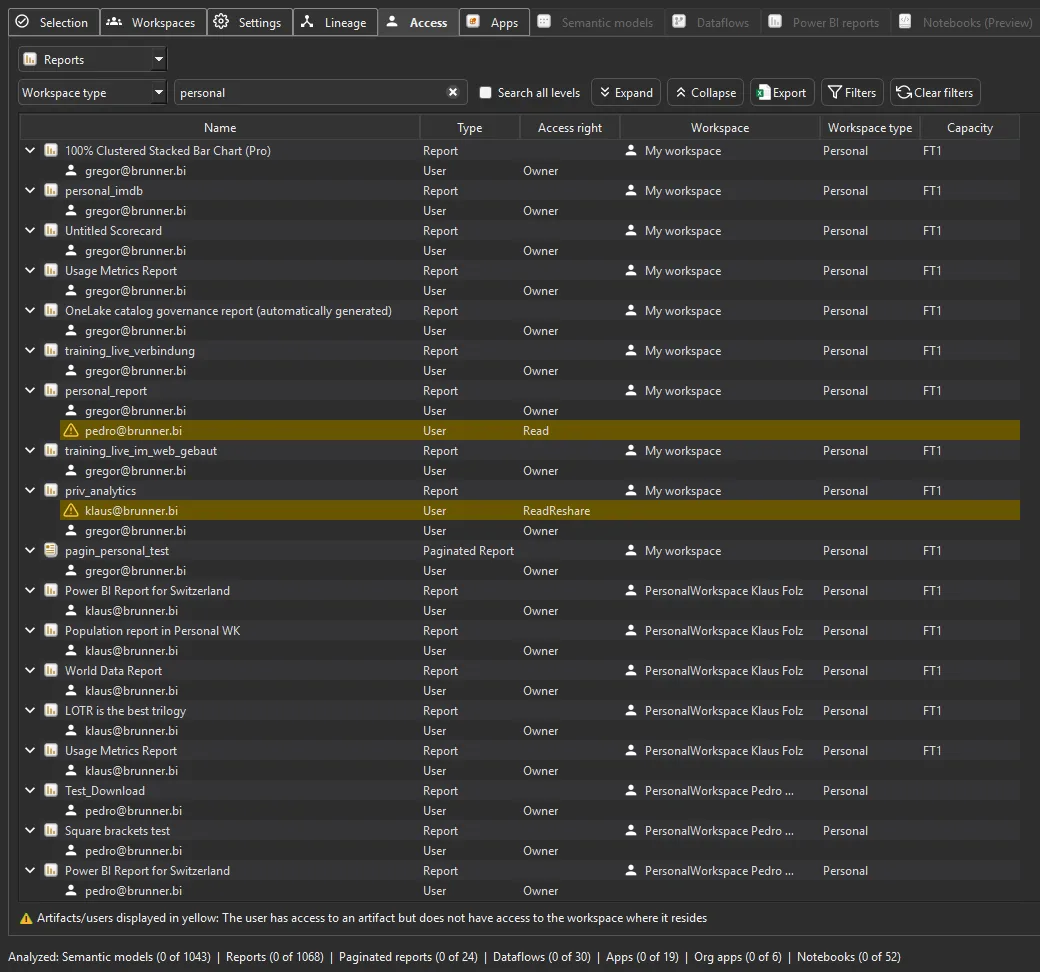
Run full Tenant Analysis with personal workspaces included. You see how many items each personal workspace holds, and in the Access tab every report shared out of a personal workspace with whom it is shared.
Last updated · November 21, 2026
Steps
- Open Tenant Analysis with a Fabric Admin account and tick personal workspaces in the workspace filters.
- After the inventory pass, sort the workspaces by item count. Someone with dozens of reports in “My workspace” is a migration candidate (details).
- Open the Access tab and switch the view to Reports. In the
dropdown next to the search box, pick Workspace type, then type
personalin the search box. Each report shows its owner and everyone it is shared with. Yellow rows are shared with people who are not in the workspace (details). - Check for personal workspaces on Premium or Fabric capacity and for reports built on production semantic models (details).
What you see
Go deeper
Something wrong or out of date on this page?