 Measure Killer
How do I find out who uses Excel on my semantic model, and which fields they use?
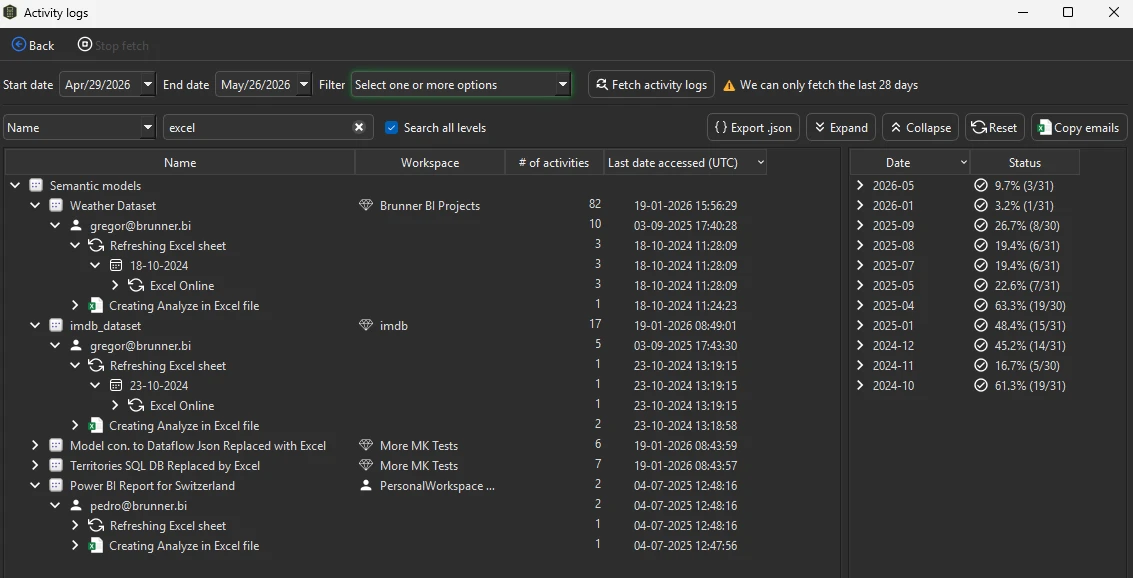
In an admin mode, fetch the activity logs and search for excel to get every user who connects to each model from Excel. Then collect their files and add them to the scan: Measure Killer shows which columns and measures each workbook uses, and they count as used in the cleanup.
Last updated · November 21, 2026
Steps
- Open Tenant Analysis and sign in with a Fabric Admin account.
- Click Activity logs in the toolbar (details).
- Keep the default 28 days, pick the activity types (only Excel is the fastest) and click Fetch.
- Search for
excel. Each model expands into its activities, the users behind them and the application they used, with the last date and how many days they were active (details). - Use Copy emails to ask those users for their files.
- Drag the
.xlsxfiles into the analysis of the model, for example a Shared model online scan, and click Analyze (details). - Each Excel file appears next to the Power BI reports. Expand it to see the columns and measures it uses. Those fields count as used, so a cleanup does not remove what a PivotTable depends on (details). Measure Killer reads the connection and the PivotTable fields of each file.
What you see
Go deeper
Something wrong or out of date on this page?