 Measure Killer
How do I see page views for every report page across a workspace or the whole tenant?
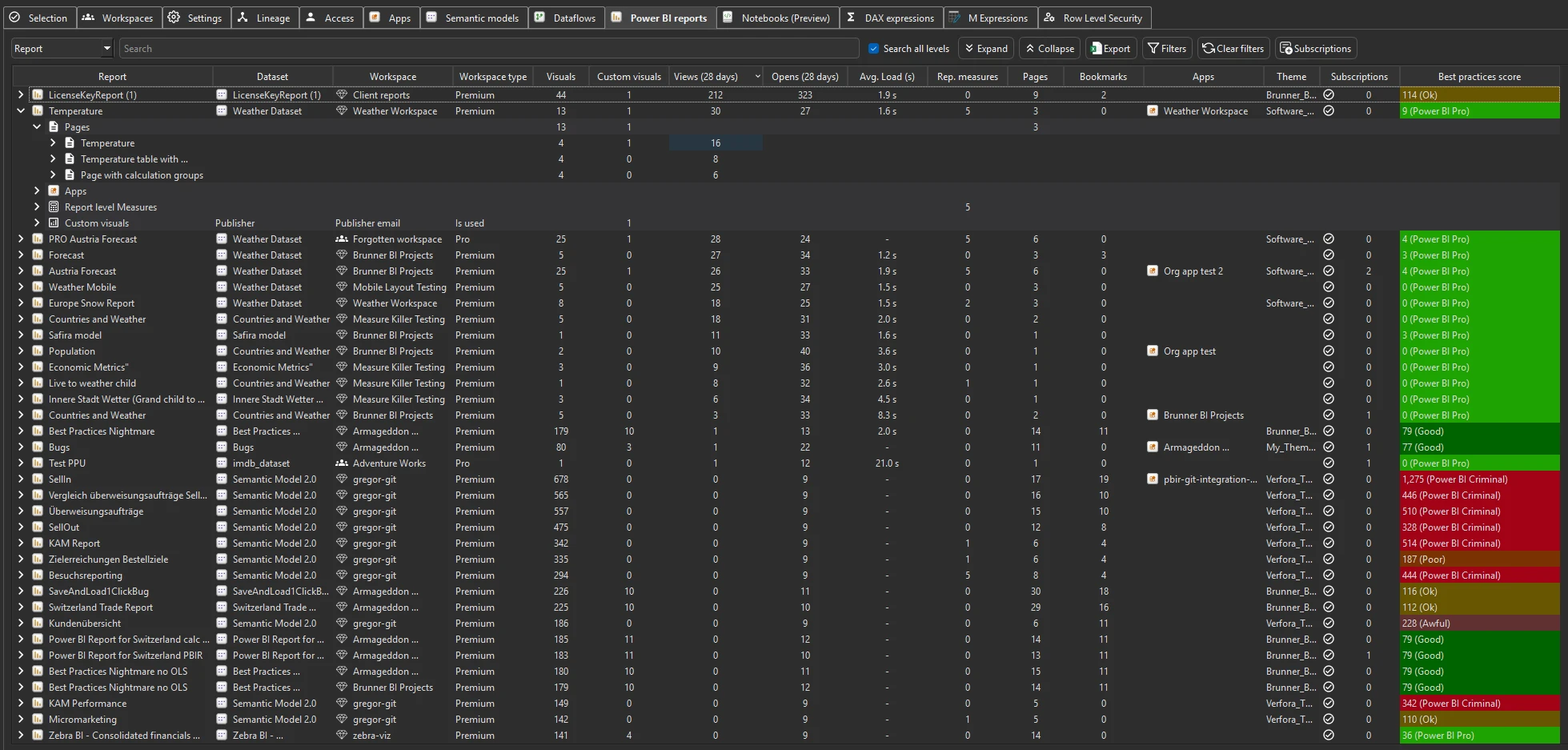
Run Tenant Analysis on a workspace or the whole tenant with Get report page views and load times ticked. Every report expands into its pages with their views, Report views in the toolbar breaks them down by date, and the Report page views export gives you all of it at page level.
Last updated · November 6, 2026
Steps
- Open Tenant Analysis, or Limited Tenant Analysis for your own workspaces, and tick Get report page views and load times in the filters.
- On the Selection tab, tick a whole workspace, several workspaces or everything, and click Analyze (details).
- On the Power BI reports tab, expand a report: each page is listed with its own page views over the last 28 days (details).
- Click Report views in the toolbar for every report and page broken out by date, and export it to Excel (details).
- For your own analysis, use the Report page views JSON export: page level, by date, for everything you scanned (details).
- Scan regularly. Each scan merges into a local database, so the page history grows past the 28 days Power BI keeps.
What you see
Go deeper
- Report views & opens
- See report consumption
- Clean your model: suggestion 9 removes pages with no views
Something wrong or out of date on this page?