 Measure Killer
How do I find slow Power BI reports?
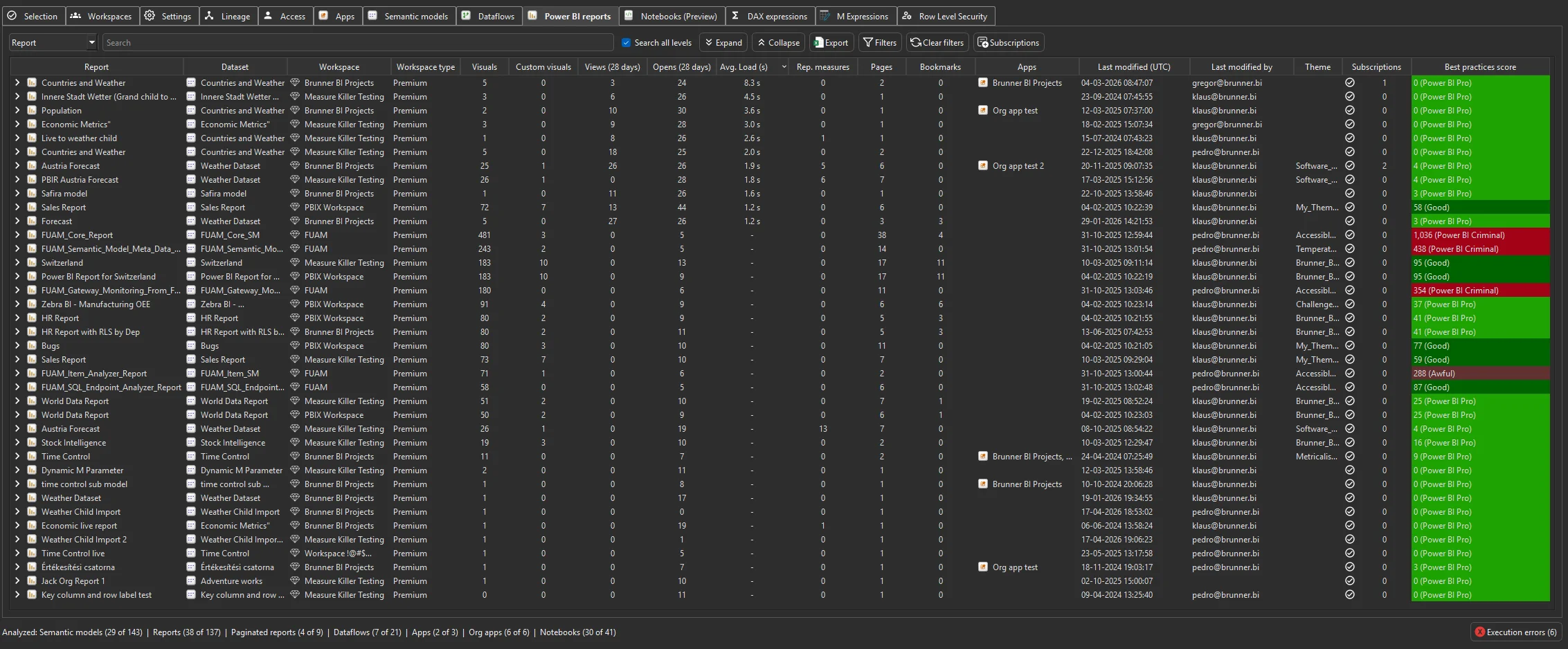
Enable Get report page views and load times before a Tenant Analysis scan, then sort the Average load time column on the Power BI reports tab. It is the time real users wait for each report, averaged per user.
Last updated · November 21, 2026
Steps
- Open Tenant Analysis or Limited Tenant Analysis and tick Get report page views and load times in the filters.
- Tick the reports, or the models whose reports you want, and click Analyze (details).
- On the Power BI reports tab, sort Avg. Load (s), the average load time, descending.
- Read it against the opens: a slow report that hundreds of people open is worth fixing first. Under 3 seconds is good, over 10 seconds is a problem (benchmarks).
- Check the report’s best practices and the model behind it for the cause (details).
What you see
Go deeper
Something wrong or out of date on this page?