 Measure Killer
How do I check my Power BI models and reports against best practices?
Scan one model in Power BI Desktop for free, or every model in Tenant Analysis. Each model and report gets a best-practices score, from Power BI Pro to Power BI Criminal, with every violation listed so you can fix the worst ones first.
Last updated · November 9, 2026
Steps
One model, open in Power BI Desktop (free):
- Open the file in Power BI Desktop, pick Single model and report and click Analyze (details).
- Click Model best practices in the toolbar for the model, or Report best practices for the report (details).
- Expand a rule to see every violation with the affected object and its severity.
All models and reports in a tenant or your workspaces:
- Run Tenant Analysis or Limited Tenant Analysis, tick the semantic models and click Analyze (details).
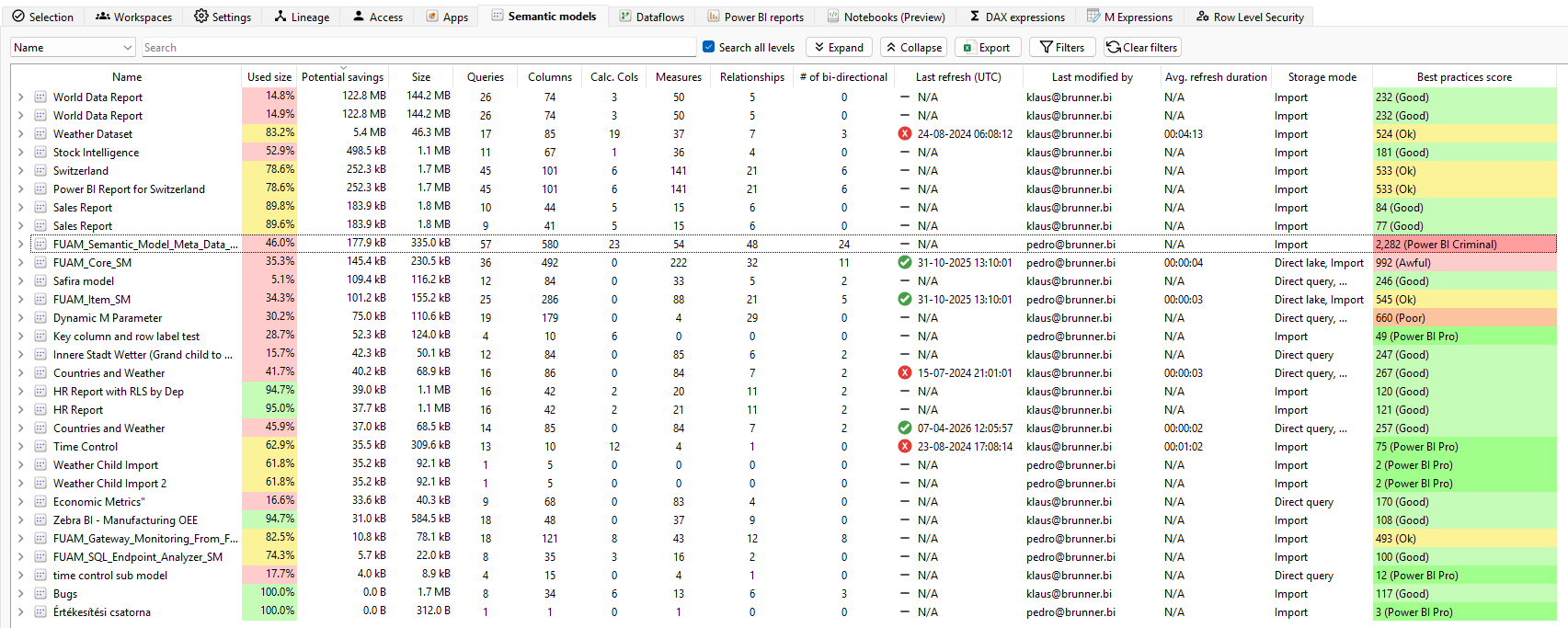
- On the Semantic models tab, sort the Best practices score column descending. The higher the number, the worse the model.
- Right-click a model and pick Best practices for its full list of violations. For a report, right-click it on the Power BI reports tab and pick Report best practices.
Both: decide which rules count in Settings on the launch window. Each model rule has a severity you can include or exclude, and several report rules have thresholds you can change (details).
What you see
Go deeper
- Best-practice analysis (reports + models): every rule explained
- Clean your model: step-by-step optimization suggestions
Something wrong or out of date on this page?