 Measure Killer
How do I check which custom visuals are used in Power BI, and whether we are licensed for them?
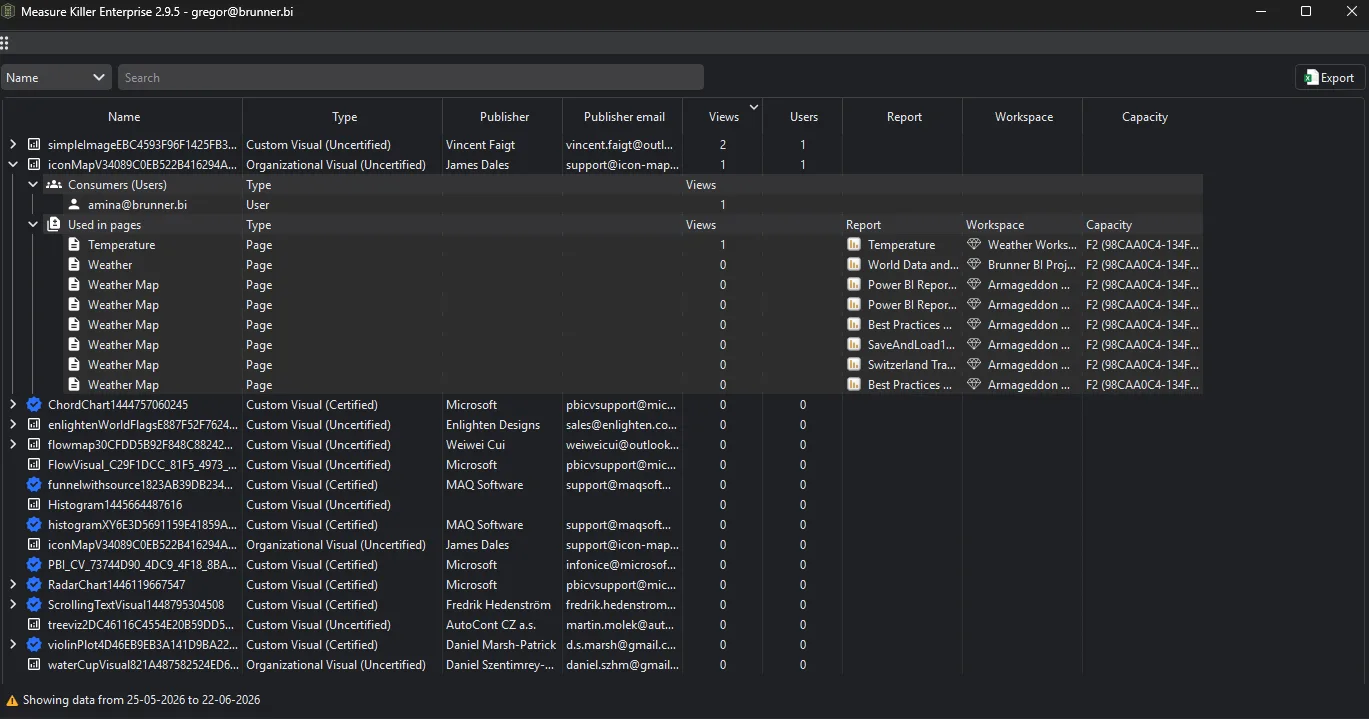
Enable custom visual consumption before a Tenant Analysis scan. You get every custom visual in use, certified or not, with the reports and pages it is on and the users who view it, so you can check licenses per user and find uncertified visuals.
Last updated · November 21, 2026
Steps
- Open Tenant Analysis or Limited Tenant Analysis and tick Enable custom visual consumption analysis in the filters.
- Tick the reports, or the models whose reports you want, and click Analyze (details).
- Click Custom visual consumption in the toolbar. Each visual shows its publisher, whether it is certified, its views and the number of users. Expand it for the report pages that use it.
- Licenses: expand a visual to see its Consumers (Users) and compare that number with the licenses you bought.
- Security: filter for uncertified visuals and check which reports use them, starting with sensitive workspaces.
- The Custom visuals column on the Power BI reports tab counts certified and uncertified visuals per report.
What you see
Go deeper
Something wrong or out of date on this page?