 Measure Killer
How do I add or remove a user or group across many workspaces at once?
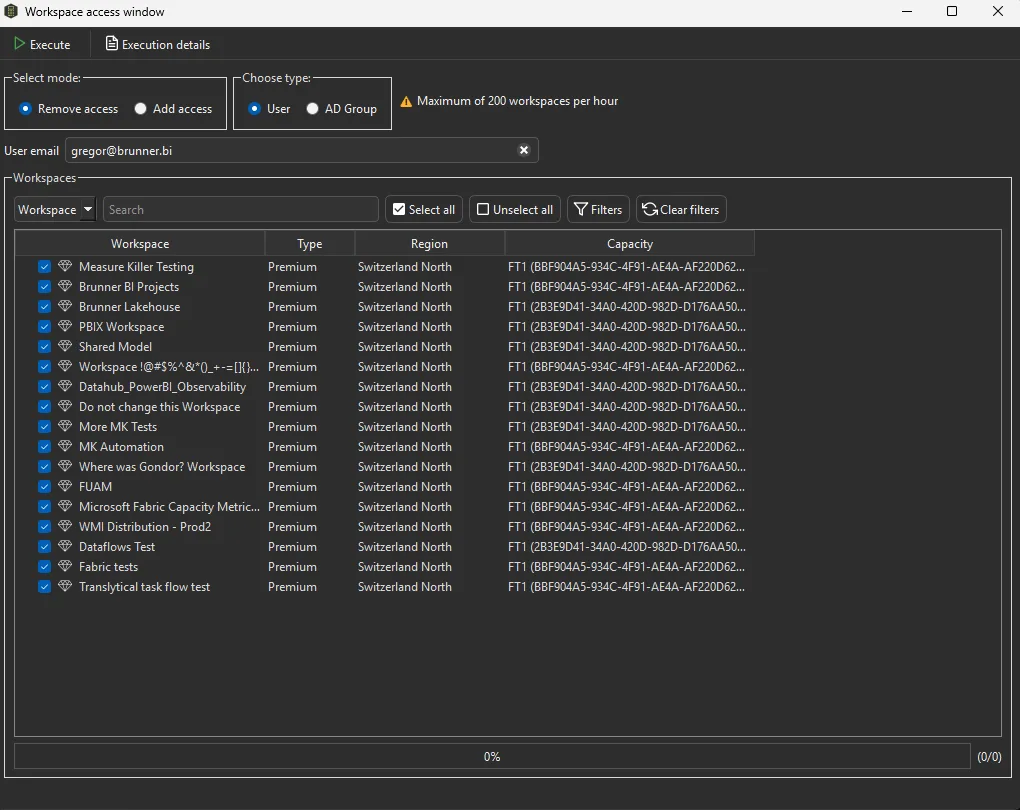
In Tenant Analysis under Admin modes, open Workspace access in the toolbar. Grant or remove access for a user or an AD group on one or many workspaces at once, and Measure Killer applies it through the admin API in one go.
Last updated · November 6, 2026
Steps
- Open Tenant Analysis under Admin modes with a Fabric Admin account and click Workspace access in the toolbar. It is not available in Limited Tenant Analysis (details).
- Choose Add access or Remove access, and User (by email) or AD Group.
- When adding, pick the role: Admin, Member, Contributor or Viewer.
- Tick one workspace or as many as you need. Search, Filters and Select all help with long lists.
- Click Execute. There is no automatic rollback, so if you remove someone by mistake, add them again (details).
What you see
Go deeper
Something wrong or out of date on this page?