 Measure Killer
How do I audit row-level security (RLS) roles, filters and members across my models?
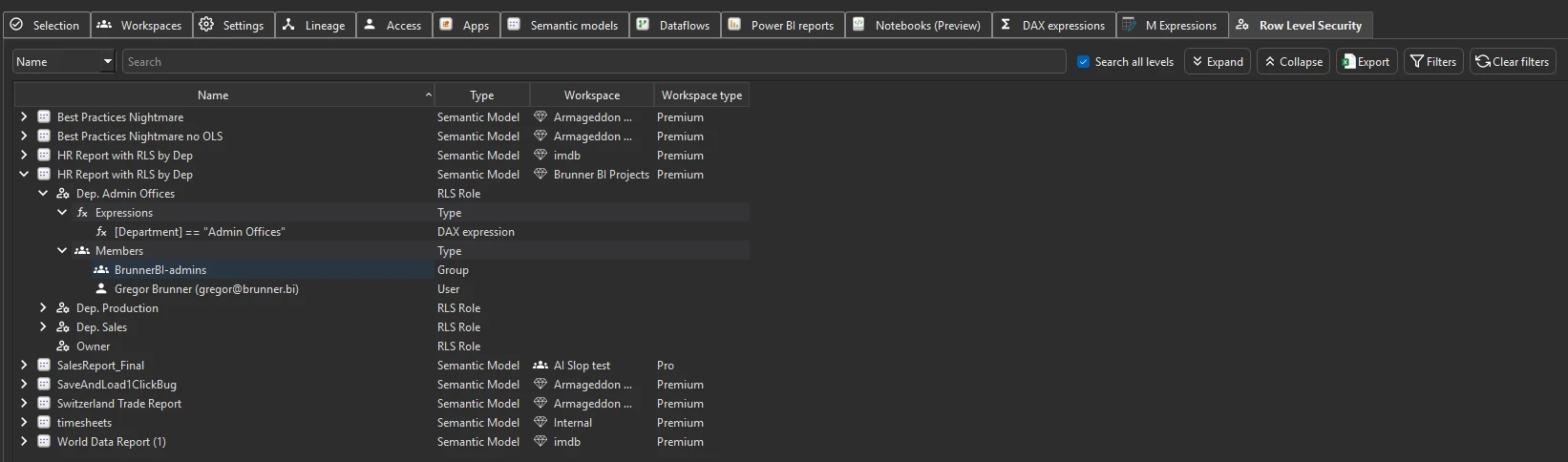
Run Tenant Analysis and open the Row Level Security tab. It lists every RLS role in every analyzed model, with its DAX filter, the tables it filters, and the users and groups assigned to it.
Last updated · November 21, 2026
Steps
- Open Tenant Analysis or Limited Tenant Analysis and keep Include Row Level Security (RLS) ticked in the filters.
- Tick the models and click Analyze. RLS is read in Phase 2 (details).
- Open the Row Level Security tab: each model expands into its roles, and each role into its filter expressions and members.
- Search for a user or group to see every role they are in, across all models, or for a table to see every filter on it (workflows).
- Roles assigned to a security group show the group, not its members. Check the group membership in Entra for the full picture (details).
What you see
Go deeper
Something wrong or out of date on this page?