 Measure Killer
How do I see the impact of changing a database table or view on Power BI?
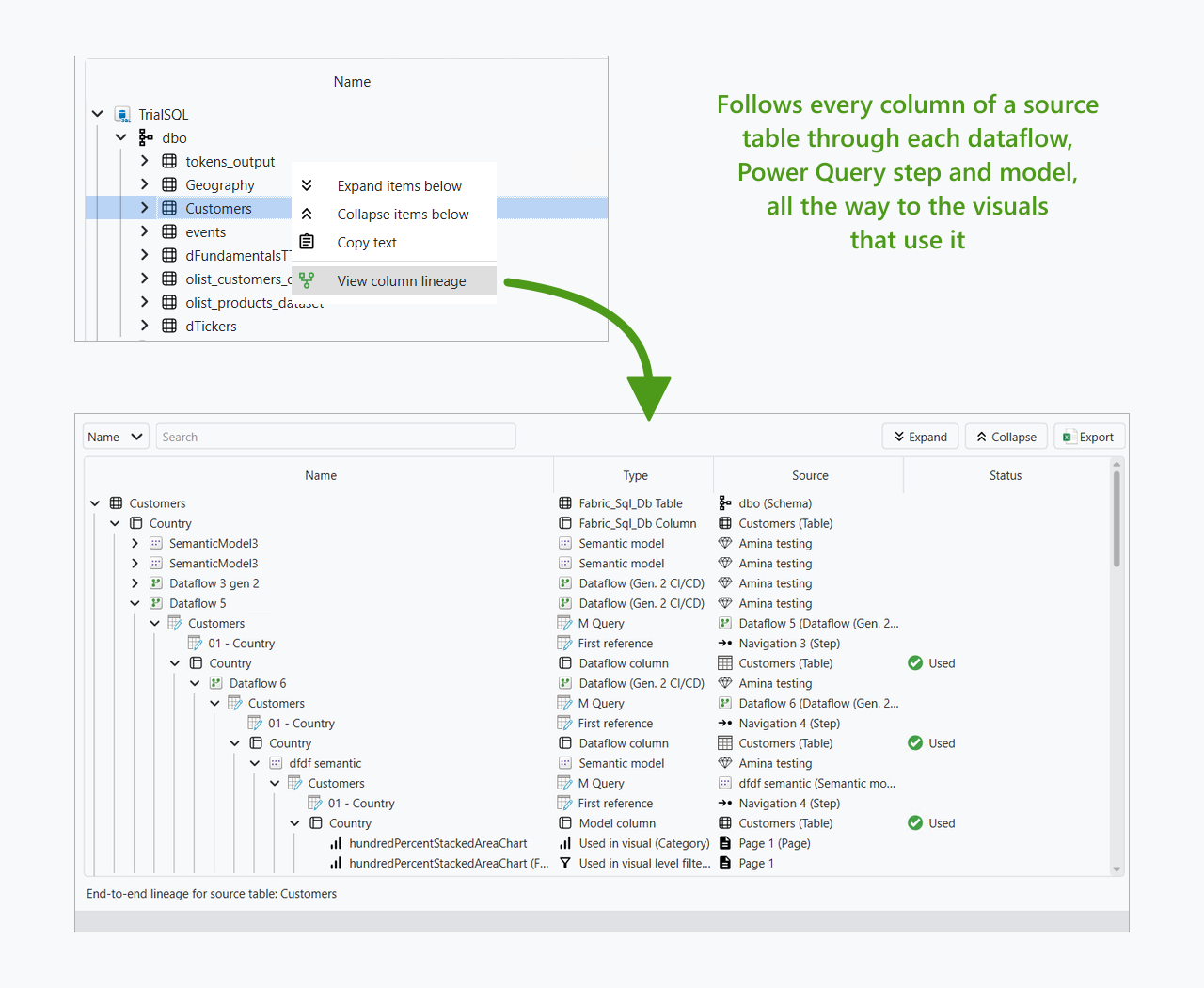
Start Tenant Analysis from the data source you are about to change, then right-click the table, view or column and pick View column lineage. You get every dataflow, semantic model, report and visual that would break, before the change goes out.
Last updated · November 6, 2026
Steps
- Open Limited Tenant Analysis, or Tenant Analysis if you need the whole tenant (which one?).
- On the Selection tab, click Datasources and tick the server or database you are about to change. Measure Killer selects every dataflow, semantic model, report and paginated report downstream of it.
- Click Analyze.
- Open the Column lineage tab and expand the source down to the table or view, or right-click it and pick View column lineage. Right-click a whole schema to check a bigger restructuring at once.
- Read the result from top to bottom: every Power Query step the columns pass through, every model column that reads them and whether it is used, and every visual, filter and paginated report field at the end.
- For a source that is not supported at column level yet, search the M expressions tab for the table or view name instead (details).
What you see
For the item-level answer, “which models and reports depend on this server at all?”, use the Item lineage tab in the Data sources view (details).
Go deeper
Something wrong or out of date on this page?