 Measure Killer
How do I find unused queries and columns in a Power BI dataflow?
Open Dataflow Analysis, pick the dataflows and let Measure Killer find every dataflow, semantic model, report and paginated report downstream. Columns none of them use are your cleanup candidates. Consumers outside Power BI are not tracked, so check those before you remove anything.
Last updated · November 6, 2026
Steps
- On the welcome screen, open Admin modes and click Dataflow Analysis (details).
- Sign in, set the tenant filters and choose Search my whole tenant, so every consumer is found wherever it lives (details).
- Tick one or more dataflows (Gen1, Gen2 or Gen2 CI/CD) and click Next, then Analyze on the Selection tab.
- Read the Execution Summary: referenced and not referenced queries and columns, and the downstream dataflows, semantic models and reports (details).
- Open the Results tab and click Unused. That is your list of columns nothing downstream uses. Export takes it to Excel.
- Remove them in the Power Query editor of the dataflow. There is no automatic cleanup for dataflows yet (details).
What counts as used
Measure Killer tracks what Power BI uses: downstream dataflows, semantic models, reports and paginated reports, down to the visuals and filters. Excel files connected to those models can count too, but that takes extra work: collecting the files and adding them to the analysis (details).
Anything that reads the dataflow outside Power BI is not tracked: a notebook, a pipeline, another tool or a direct connection. Check those before you remove a column.
What you see
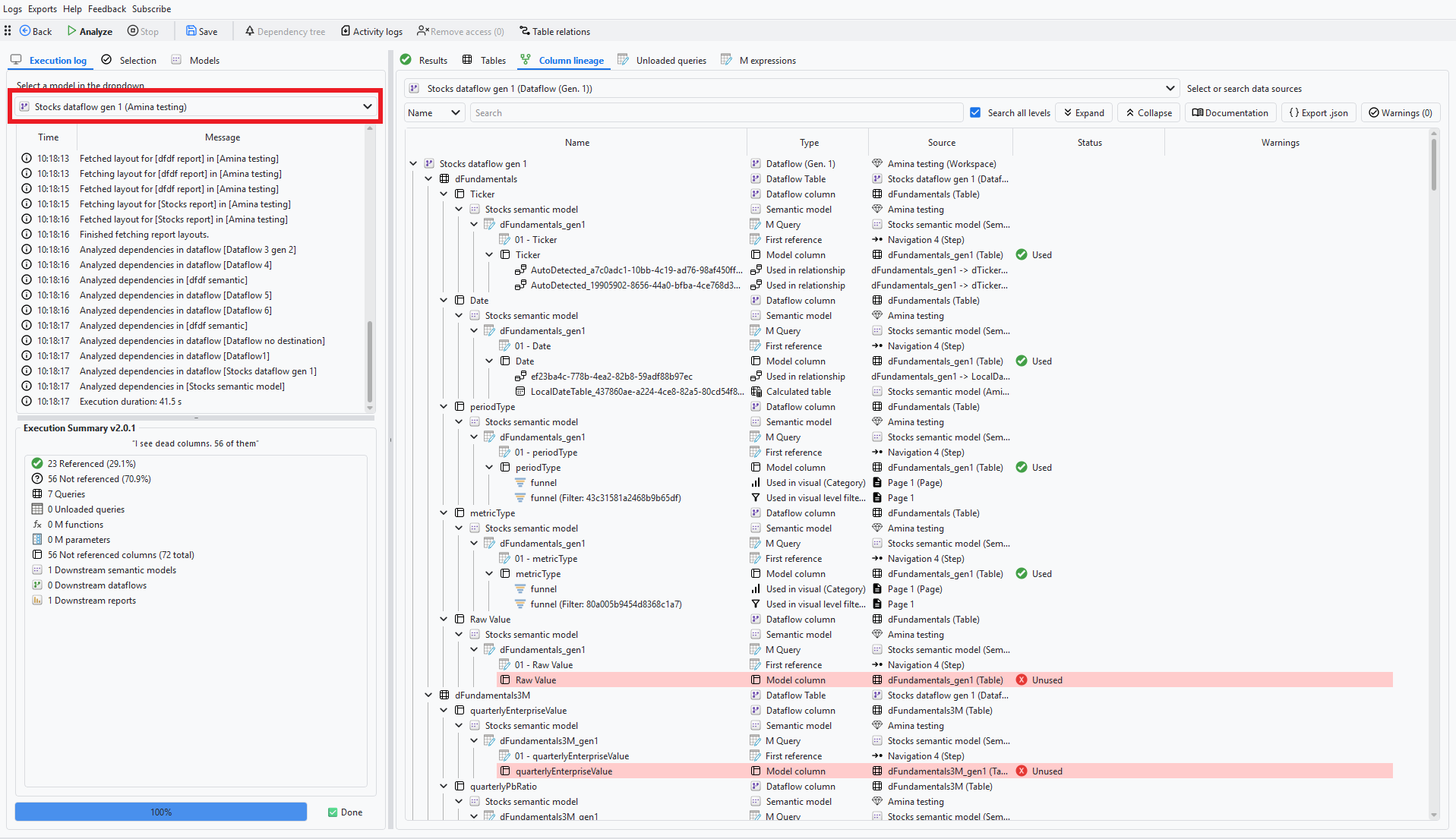
Go deeper
- Analyze and clean up a dataflow
- Clean up a semantic model: the same for a model
Something wrong or out of date on this page?