 Measure Killer
How do I get Power BI lineage into Databricks Unity Catalog or Snowflake?
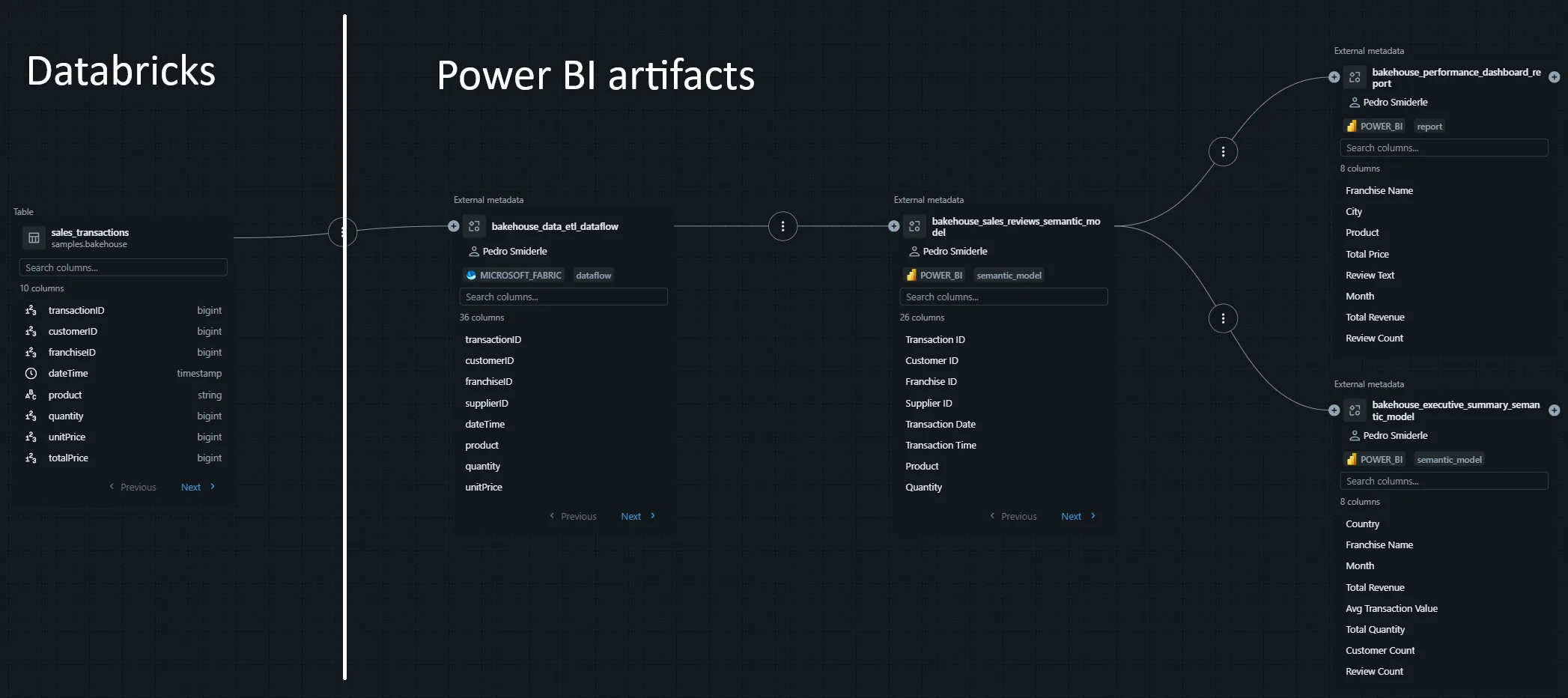
MK Automation scans the tenant on a schedule and writes the Power BI lineage into Databricks Unity Catalog or Snowflake, so your data team sees which reports and visuals use each table and column without leaving their catalog.
Last updated · November 6, 2026
Steps
- Set up MK Automation. The job runs a tenant scan and builds the lineage graph across your Power BI and Fabric estate.
- Point it at your catalog: the Databricks workspace URL and a service principal or PAT, or your Snowflake account (Snowflake permissions).
- Run the push. Measure Killer matches your tables to the Power BI items that consume them and writes the lineage into the catalog (Databricks, Snowflake).
- Schedule it on the same cadence as your scan, daily or weekly. Each run reconciles with the last one, so renamed and deleted items do not leave orphans.
What you see
Go deeper
Something wrong or out of date on this page?