 Measure Killer
How to find semantic models with broken DAX (measures, columns, tables)
Broken DAX hides — it surfaces as a broken visual or wrong number later. Find every model with failing measures, columns, or tables across your tenant.
Broken DAX doesn’t announce itself
When a DAX expression breaks, nothing rings an alarm. The semantic model still refreshes. The report still opens. The breakage surfaces downstream, at the worst possible place: a visual rendering “Something’s wrong with one or more fields” in front of a business user, or - worse - a number that’s silently wrong.
How does DAX break in the first place, without anyone editing the measure? The usual suspects:
- A column or table was renamed or removed - every measure and calculated column referencing it now fails.
- An upstream schema change - the source system renamed a field, the Power Query step was fixed, but the DAX still points at the old name.
- A refactoring that didn’t propagate - a base measure was changed or deleted, breaking the measures built on top of it.
A model with hundreds of measures accumulates these quietly. The author has moved on, dependencies are undocumented, and nobody opens each measure to check whether it still evaluates.
The problem with finding broken DAX manually
To check a single model, you’d open it in Power BI Desktop or Tabular Editor and inspect the measures one by one - error icons only show up where you look. Across a tenant with dozens or hundreds of semantic models, there is no built-in way to ask the question you actually have:
Which of my models contain DAX that currently fails - and which expressions are they?
Find every model with broken DAX in Measure Killer
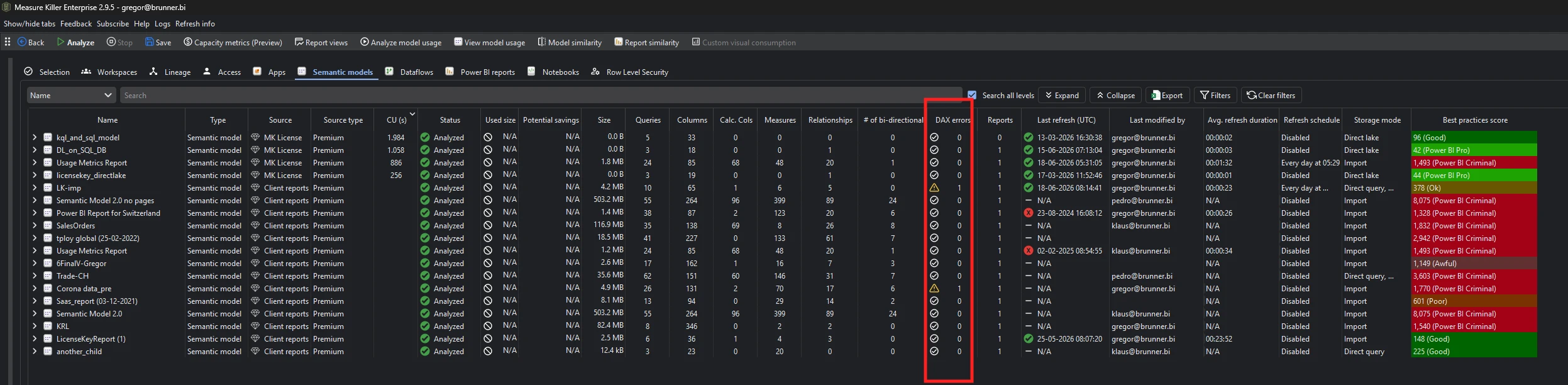
Measure Killer v2.9.5 adds a # of DAX errors column to the Semantic models tab in Tenant Analysis: for every scanned model, the number of DAX expressions - measures, calculated columns, and calculated tables - that currently contain errors.
If the number isn’t zero, something in that model no longer evaluates - and you found it without opening a single measure.
Steps
- Open Measure Killer and run a tenant-wide scan (or a workspace-level scan if you only need a subset).
- Complete Phase 2 - select the semantic models you want to analyze and click Analyze.
- Open the Semantic models tab and sort the # of DAX errors column descending. The models with failing expressions float to the top.
- Switch to the DAX expressions tab to see the actual expressions behind the count - which measure, which calculated column, which calculated table.
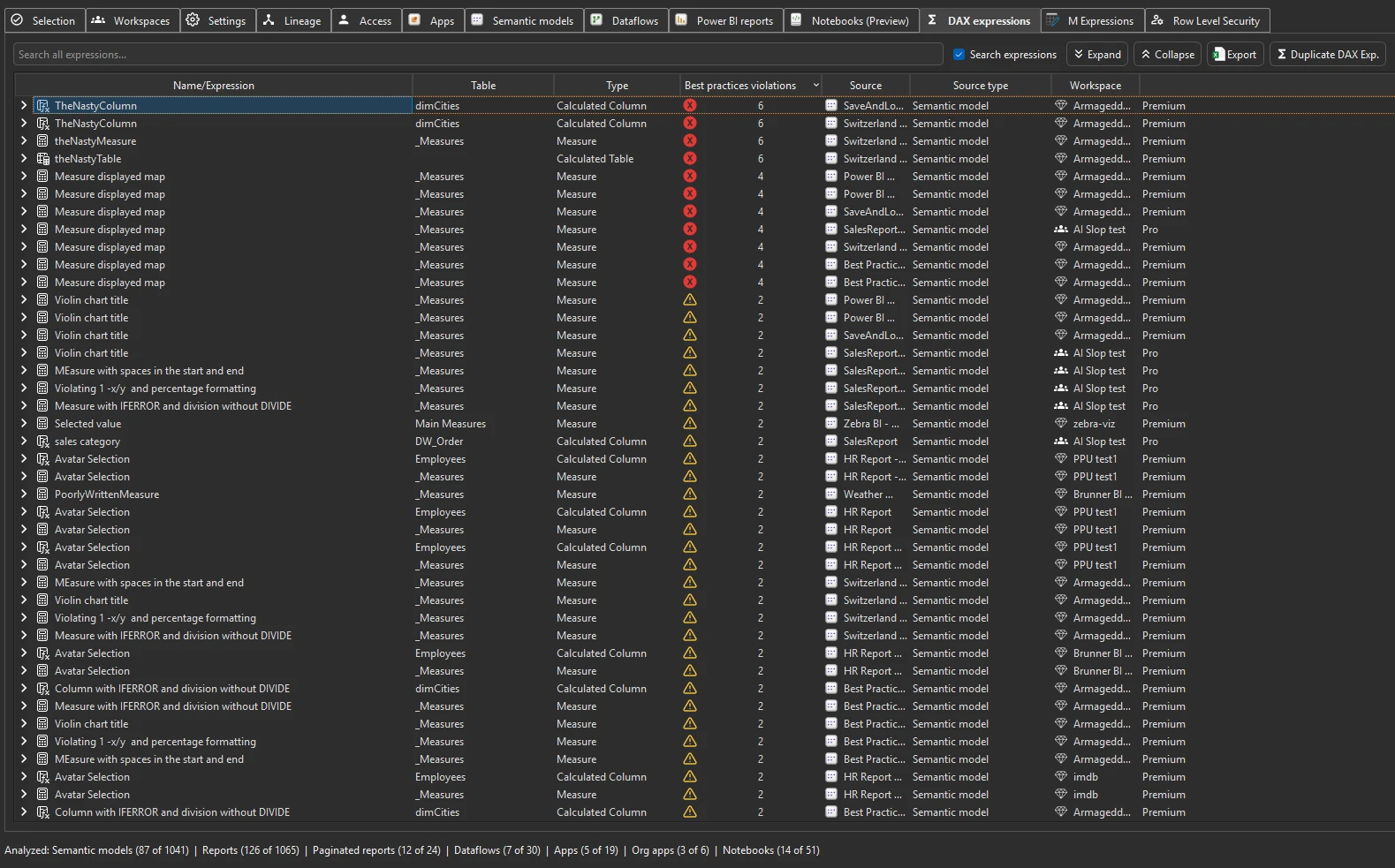
The DAX expressions tab collects every expression from every scanned model in one searchable place - so once you know which model has errors, getting to which expression is a search away. It also flags best-practice violations and duplicate measures while you’re there.
This works the same way in Limited Tenant Analysis mode - you don’t need a Fabric Admin account. Workspace Contributor access is enough.
You can do all of this with a free trial - no credit card, no commitment. Request a trial and check your own tenant.
Where broken DAX hits your users: broken visuals
A failing measure isn’t just a model hygiene problem - any visual built on it renders an error instead of data. v2.9.5 closes that loop from the report side too: the Power BI reports tab gets a Broken visuals column, and the detail view tells you when the reason a visual broke is a failing DAX expression - including the exact syntax error.
So you can work in either direction:
- Model-first: sort models by # of DAX errors, fix the expressions, and every visual built on them recovers.
- Report-first: start from broken visuals on high-traffic pages and trace each one back to the broken expression behind it.
Check after every schema change or migration
“Did that change break any DAX?” usually gets answered by a confused user, days later. With the # of DAX errors column it gets answered by a re-scan: after a source-system rename, a model cleanup, or a migration, sort the column and compare. A measure referencing a column that no longer exists shows up immediately - before the first user opens the report it powers.
If you’re planning the change rather than reacting to it, do the impact analysis up front: search the DAX expressions tab for the table or column you’re about to rename and you’ll see every expression that references it.
Automate it
If you’re running MK Automation, the DAX error count is produced on every scheduled scan - so a measure that breaks on Tuesday is in your hands before the Monday steering meeting, not after it.
For the full how-tos, see the Semantic models inventory and DAX expressions docs.