 Measure Killer
How big can a semantic model get on a Fabric F0 capacity?
Microsoft documents the semantic model memory limit from F2 upwards, but not for F0. I measured it: the limit is the same 3 GB as on F2, but a normal refresh fails long before your model reaches that size.
 Gregor Brunner
When Microsoft introduced the F0 SKU, I was curious. F0 is billed per CU-hour, so the capacity seems like it can scale infinitely. But compute is not the only limit that comes with a capacity size, and I wanted to test the others too. The first one: how big can a semantic model get on F0? The documentation lists the memory limit per model for F2 and up (3 GB for F2 to F8, 5 GB for F16 and so on), but F0 is not in the table. So I created an F0 capacity, put a workspace on it and kept refreshing a test model with more and more rows until it broke.
What the documentation says
The semantic model SKU limitation table starts at F2 with 3 GB max memory per model. The footnote is the important part: memory has to be reserved for refreshes and queries, so the largest model you can actually have might be smaller than that number.
What it does not say is how much smaller. A full refresh is transactional, the old copy of the model stays in memory (so the reports keep working) while the new copy is built, and both count against the same limit.
What F0 costs
F0 is not billed with a fixed monthly price, you pay per CU-hour consumed, and the rate depends on the workload:
| Rate per CU-hour | Multiple | Workloads |
|---|---|---|
| $0.18 | 1.0x | Spark Memory Optimized, Data Movement, Data Orchestration, Copilot and AI, SSIS, all OneLake operations |
| $0.216 | 1.2x | Dataflows Standard Compute, High Scale Dataflow Compute |
| $0.234 | 1.3x | Data Warehouse, dbt job |
| $0.2448 | 1.36x | Eventhouse |
| $0.27 | 1.5x | Apache Airflow job, VNet Data Gateway |
| $0.36 | 2.0x | SQL database, Cosmos DB in Fabric, GraphQL, user data functions |
| $0.54 | 3.0x | Power BI, Eventstream, Activator, Fabric Planning, Maps and a few more |
Disclaimer: Microsoft published these multipliers but has since removed the page, so the rates may have changed. I saved them while the page was online.
So every semantic model refresh and every DAX query is billed at the highest rate, 3x the base price.
The results
When a refresh does not fit, the Resource Governor cancels it, and the error message says how much memory the refresh consumed, what the limit was and how much the model already occupied before the refresh started:
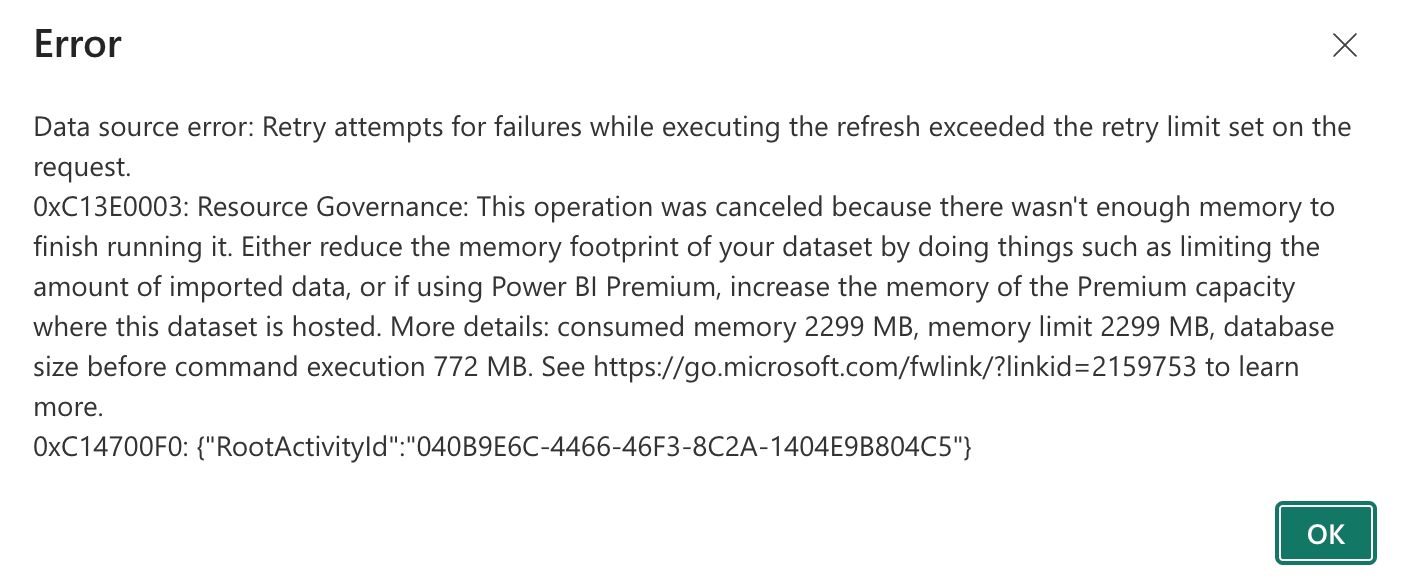
Here the limit was 2299 MB with 772 MB already in memory. Two other failed refreshes reported 3040 MB plus 31 MB and 3068 MB plus 3 MB. All three add up to 3071 MB. So F0 has the same limit as F2, about 3 GB per model, minus whatever the model already occupies.
How big the model can actually get depends on how you refresh it. I filled a test model with text-heavy data until the refresh failed. With a clearValues refresh before every full refresh (so only one copy is in memory):
| Model size in memory | Full refresh |
|---|---|
| 2.73 GB | Completed |
| 2.93 GB | Completed |
| slightly more | Failed |
But nobody clears their model before a scheduled refresh, the reports would be empty in the meantime. With a normal full refresh on top of the existing data:
| Model size in memory | Full refresh |
|---|---|
| 1.50 GB | Completed |
| 1.86 GB | Completed |
| 2.26 GB | Failed |
So with a normal refresh the model can be somewhere between 1.86 and 2.26 GB, not 3 GB. It is more than half of the limit because the Resource Governor counted the old copy of the 2.26 GB model as only 761 MB.
Large storage format does not help
In large semantic model storage format the size you see in the DMVs drops to about a third (0.90 GB instead of 2.93 GB for the same data), because the text dictionary is stored compressed. But the same data passed and failed exactly as before. What hits the limit is the peak memory during the refresh, not the size of the model afterwards.
Making a model fit
If your model is close to the limit there are a few options: refresh by partition or use incremental refresh so only part of the model is rebuilt at a time, run a clearValues refresh first (with empty reports in between), or make the model smaller.
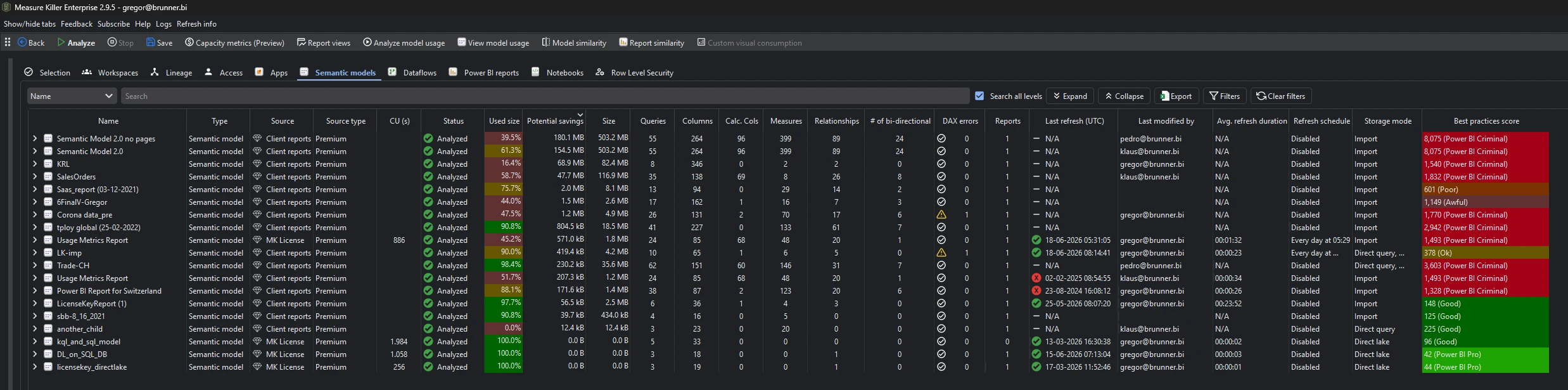
The last one is usually the easiest. In the Semantic models tab of Measure Killer’s Tenant Analysis we see the size of every model in the tenant, how much of it is actually used and how much we could save:
A model where only 30% of the size is used by any report, measure or relationship does not need a bigger capacity, it needs a cleanup. With Clean your model the unused columns and measures are removed in one go.
Editions and permissions
Measure Killer’s free version analyzes models in Power BI Desktop. The Semantic models tab with used size and potential savings across the whole tenant is part of Tenant Analysis, which needs an Enterprise license and is fully available in the trial. As a Fabric administrator you see every model in the tenant, without admin rights Limited Tenant Analysis covers the workspaces where you are at least a Contributor. More in the docs: Semantic models inventory.
You can request a free trial of Measure Killer here.
Conclusion
F0 has the same 3 GB memory limit per semantic model as F2, it is just not documented. With a normal scheduled refresh the model has to stay well below that, in my test somewhere between 1.9 and 2.3 GB, and large storage format does not change that. Since Power BI work is billed at 3x on F0, removing what is not used pays off twice on this SKU.